
.
ha-ha!
This is how the viewport size is changed.
.
Starling.current.stage.stageWidth = 1920;
Starling.current.stage.stageHeight = 200;
.
var viewPort:Rectangle = new Rectangle(0, 0, Starling.current.stage.stageWidth, Starling.current.stage.stageHeight);
Starling.current.viewPort = viewPort;
.

.
Why hasn’t the viewport changed?
.
Starling.current.stage.addEventListener(Event.RESIZE, function(e:Event):Void {
		Starling.current.stage.stageWidth = Starling.current.nativeStage.stageWidth;
		Starling.current.stage.stageHeight = Starling.current.nativeStage.stageHeight;

		var viewPort:Rectangle = new Rectangle(0, 0, Starling.current.stage.stageWidth, Starling.current.stage.stageHeight);

		Starling.current.viewPort = viewPort;

		trace(Starling.current.stage.stageWidth, Starling.current.nativeStage.stageWidth);
	});
.
.
It seems that the stage and viewport sizes have changed
.
Just the content hasn’t changed
So I couldn’t tell at first
.
If anyone finds any problems, they can speak up
.
You might need to clarify, is that now doing what you wanted it to do? Or were you wanting content to scale too?
1 Like
.
I want to achieve windowing and full screen switching.
.
For example, initially it was windowing
.
Click the button. I want to switch to full screen mode
.
How to write code to achieve full screen mode?
.
.
Ah。
Has no one told me how to achieve full screen?
.
How can everyone achieve it?
.
It’s been a while since I’ve needed to do this. I’ve refactored some AS3 code I used to manage this with. With this, you can press the f key to toggle between fullscreen and windowed mode. The Starling context is scaled up or down, maintaining aspect ratio.
All this happens within the OpenFL context, not the Starling context, although the ResizeEvent.RESIZE listener is added to the Starling context. I hope that makes sense.
If you don’t mind stretching your content (generally not desirable), comment out the algorithm below under // Auto-fit any resolution maintaining aspect, and un-comment the one under // Auto-fit any resolution with stretch.
package;

import openfl.Assets;
import openfl.display.Shape;
import openfl.display.Sprite as OpenFLSprite;
import openfl.display.StageDisplayState;
import openfl.display.StageScaleMode;
import openfl.events.KeyboardEvent;
import openfl.geom.Rectangle;
import openfl.ui.Keyboard;
import starling.core.Starling;
import starling.display.Image;
import starling.display.Sprite;
import starling.events.Event;
import starling.events.ResizeEvent;
import starling.textures.Texture;

class Main extends OpenFLSprite {
	private var starling:Starling;
	private var shapeScaler:Shape;

	public function new() {
		super();

		// Initialize Starling
		starling = new Starling(StarlingRoot, stage);
		starling.start();

		// Starling resizer
		var originalViewPort:Rectangle = new Rectangle(0, 0, stage.stageWidth, stage.stageHeight);
		this.stage.scaleMode = StageScaleMode.NO_SCALE;

		shapeScaler = new Shape();
		shapeScaler.graphics.beginFill(0);
		shapeScaler.graphics.drawRect(originalViewPort.x, originalViewPort.y, originalViewPort.width, originalViewPort.height);
		shapeScaler.graphics.endFill();

		Starling.current.stage.addEventListener(ResizeEvent.RESIZE, stageResized);

		// Enter Standard Fullscreen State
		stage.displayState = StageDisplayState.FULL_SCREEN_INTERACTIVE;

        // Listen for keyboard event
        stage.addEventListener(KeyboardEvent.KEY_DOWN, keyDown);
	}

    /**
        Listens for f key and toggles fullscreen state.
    **/
	private function keyDown(e:KeyboardEvent):Void {
        switch (e.keyCode) {
			case Keyboard.F:
				if (stage.displayState == StageDisplayState.FULL_SCREEN_INTERACTIVE) {
					stage.displayState = StageDisplayState.NORMAL;
				} else {
					stage.displayState = StageDisplayState.FULL_SCREEN_INTERACTIVE;
				}
			default:
		}
	}

    /**
        Listens for Starling resize events and scales the entire Starling context accordingly.
    **/
	private function stageResized(e:ResizeEvent):Void {
		shapeScaler.width = e.width;
		shapeScaler.height = e.height;

		// choose the larger scale property and match the other to it;
		(shapeScaler.scaleX < shapeScaler.scaleY) ? shapeScaler.scaleY = shapeScaler.scaleX : shapeScaler.scaleX = shapeScaler.scaleY;

		// choose the smaller scale property and match the other to it;
		(shapeScaler.scaleX > shapeScaler.scaleY) ? shapeScaler.scaleY = shapeScaler.scaleX : shapeScaler.scaleX = shapeScaler.scaleY;

		// Auto-fit any resolution maintaining aspect.
		Starling.current.viewPort = new Rectangle((e.width - shapeScaler.width) / 2, (e.height - shapeScaler.height) / 2, shapeScaler.width,
			shapeScaler.height);

		// Auto-fit any resolution with stretch.
		// Starling.current.viewPort = new Rectangle(0, 0, e.width, e.height);

		trace('Stage resized to:', e.width, e.height, ' and viewPort resized to', shapeScaler.width, shapeScaler.height);
	}
}

/**
    The beginning of the Starling context.
**/
class StarlingRoot extends Sprite {
	public function new() {
		super();
		addEventListener(Event.ADDED_TO_STAGE, onAddedToStage);
	}

	private function onAddedToStage(e:Event):Void {
		removeEventListener(Event.ADDED_TO_STAGE, onAddedToStage);

		// Load the texture from the assets path
		var myImage = new Image(Texture.fromBitmapData(Assets.getBitmapData("img/atlas.png")));

        // Scale the image based on stage width.
        myImage.scale = stage.stageWidth / myImage.width;
		addChild(myImage);
	}
}
For what it’s worth, I would normally have the entry-point for my Starling context (StarlingRoot) in a separate .hx file, not the same file as Main. I’ve only put it in a single file here for simplicity sake.
.
”ResizeEvent.RESIZE“?Isn’t it ‘StarlingEvent’?
.
Perhaps I didn’t express myself very clearly
.
Browser window size changes
.
I want ‘Starling’ to synchronize to the current window size of the browser
.
Browser window size changes.
The ‘starling’ display area follows synchronization
.
.
What’s the difference?
.
starling.events.ResizeEvent.RESIZE
starling.events.Event.RESIZE
.
.
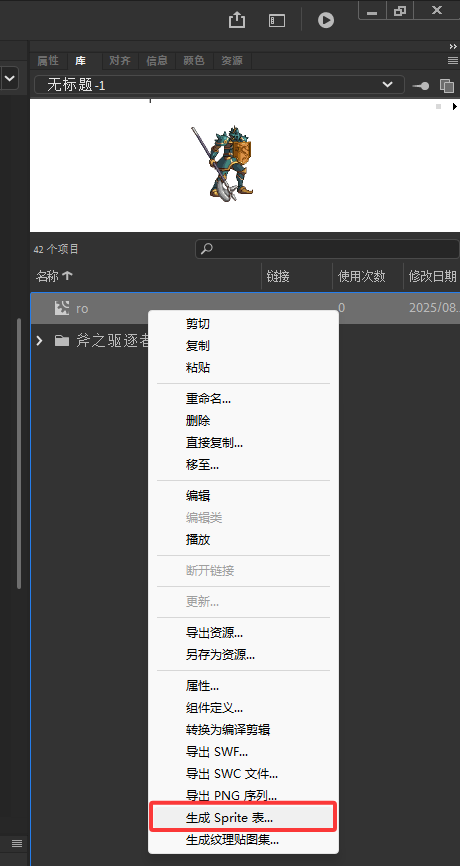
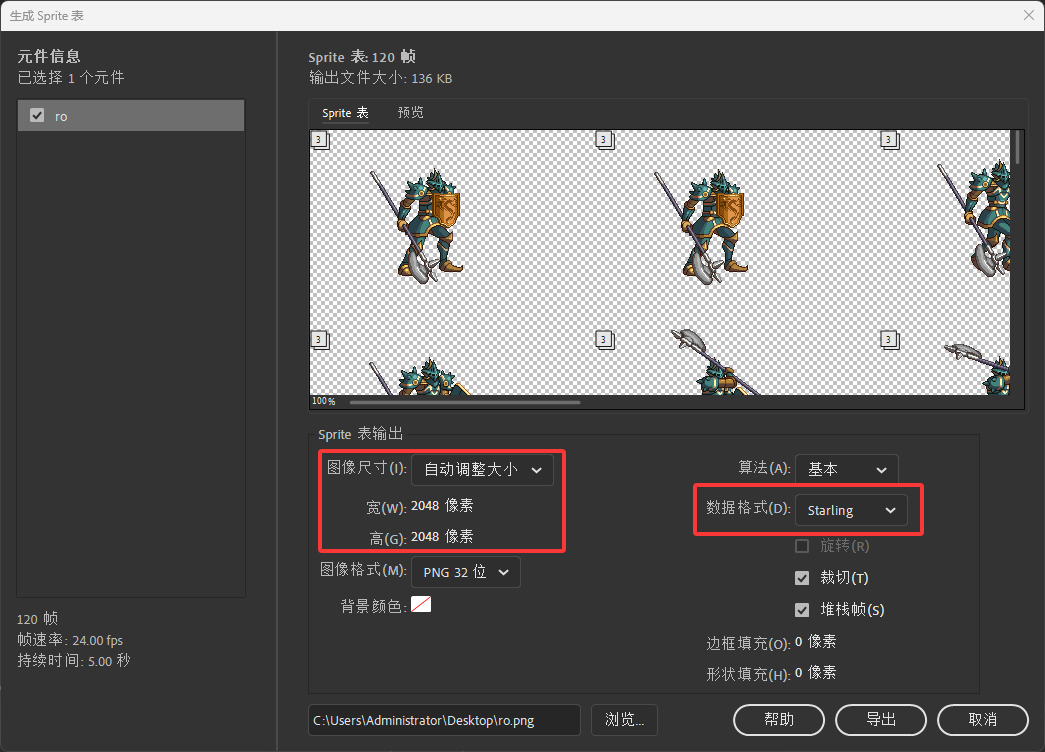
Is anyone familiar with the function of exporting “sprites” table from “Adobe Animate”?
.
I have tested that only one ‘sprite’ image can be exported
.
If my animation has a lot of frames
.
I can only export one ‘sprite’ image and can’t fit all my animation frames
.
Why can only one ‘sprite’ table be exported here?
Why is Adobe designed like this?
.
I mean, the ‘Adobe Animate’ export ‘sprite’ table feature can only export one ‘sprite’ table
.
If I have many animation frames in one animation, a single ‘sprite’ table cannot fit all the animation frames
.
Does anyone use ‘Adobe Animate’ to create animations?
.
Has anyone used ‘Adobe Animate’ to export the ‘Sprite’ table?
.
.
You might export them as an image sequence, then using one of the other tools I’ve mentioned previously, convert them to multipack spritesheets.
.
I saw an option for ‘npm’ in ‘openfl’, which allows me to develop ‘html5’ using ‘as3’
.
Has anyone used “as3” to develop “html5” for “openfl”?
.
I don’t think that anyone is using OpenFL with AS3 for real projects. It’s just an interesting curiosity at this point, in my opinion.
Some official sample projects for OpenFL and AS3/Royale are available here:
The Starling “demo” sample project for OpenFL and AS3/Royale is available here:
Fancy2209 ported the Flappy-Starling sample project to OpenFL and AS3/Royale here:
I ported a small part of the Adobe Flex framework to OpenFL and AS3/Royale here:
1 Like
‘Starling’ doesn’t seem to have a text box input?
How to implement input text in “Starling”?
How to draw a rectangle with borders?
I drew a rectangle filled with colors using Canvas
I need to add borders to the rectangle
I haven’t found any attribute in Canvas that can set the line style
Did you have a look at the link I shared earlier?
You might draw two rectangles. Firstly, the rectangle that represents the border. Secondly, the fill which sits on top.
Alternatively, you can draw the shape using openfl.display.Shape, then use the bitmapData.draw(theShape) method to convert that to BitmapData you can then bring into Starling. This method would give you much better access to drawing tools.
I know that “openfl” has rich drawing APIs
I’m asking, can’t ‘starling’ be implemented?
Perhaps you can provide some detail as to why those two options I mentioned, aren’t suitable? It’s not clear what you’re needing to accomplish.
I mean, does this effect ‘starling’ not have an API implementation? Do you want to use ‘openfl’ to complete it?