
If @joshtynjala suggestion doesn’t resolve it, perhaps share a brief screen capture?
1 Like
Does’ Starling ‘support’ vertical synchronization '?
What is the size of the texture atlas supported by “Starling 2.7”?
Is 8192x8192 supported?
.
I used to often use ‘swf’ as a resource
.
When starling, I noticed that everyone uses Asset Manager to manage resources
.
In my most recent Starling project designed for a specific content server, I used ATF texture sizes of 16,384 x 16,384. I researched and tested that though to sure it would work, as it depends on the specific GPU it’ll be running on.
The risk you have with larger textures, is support on older GPU’s. Some modest GPU’s (like integrated Intel) or old Nvidia/AMD GPU’s, may only support 8,192 x 8,192. We tested on an Intel integrated GPU (not sure of the generation) and the app wouldn’t run.
I’ve mentioned it before, but if you can, leverage ATF textures with GPU hardware compression. A PNG can be uploaded to the GPU using Starling, but it will consume more GPU memory because its compression is external to the GPU, it resides in the GPU in an uncompressed state.
Yup 
16,384 x 16,384
Super big?
Can all devices be displayed?
Isn’t it said that the larger the texture size, the worse the performance?
Why is it still so big?
No, not all devices can display. I only mention it because I can confirm Starling can support it, and that was your question 
This is where context is important. Spritesheet size has a potential relationship with draw calls. A simple example being, (and assuming this is coded considering draw calls):
- If you have two textures on screen that share the same spritesheet, you have 1 draw call.
- If you have two textures on screen that exist on two different spritesheets, you have 2 draw calls.
(it’s a little more complex than that, but that’s the jist)
Now if we’re dealing with hundreds of textures simultanously on screen, you can see how putting them all within a single spritesheet (as far as is possible), can vastly reduce draw calls. Less draw calls == higher performance.
Once the texture is in GPU memory, moving it around in most respects, is incredibly fast, even with huge textures. The slow part is getting the texture into the GPU, but that’s up to how you intialise your textures and such.
As for why so big? In this particular project, the content was displayed on a huge circular LED wall. Lots of looping idle effects (1,721 frames of animation), and then additional effects for intereactions (2,100 frames of animation). The idle frames existed on two 16,384x16,384 spritesheets, and the interactions on one 16,384x16,384 spritesheet. So all that on just three spritesheets!
It’s running incredibly well on very modest hardware, never dipping below 60fps.
1 Like
Many animation production software, such as Spine
All are published. png textures
I need high-quality image display, so I don’t compress the texture atlas, which would result in a decrease in image quality.
When will the next versions of “openfl” and “starling” be released?
We are looking forward to it.
Can I force the mobile phone to rotate the screen in the ‘openfl starling html5’ project?
We’re likely to release updates for OpenFL and Lime with the latest bug fixes soon.
It is likely to be much longer before there’s a new Starling release.
No. Web browsers don’t give you that level of control over the device.
1 Like
The original images are typically PNG before being packed into a spritesheet, so that’s not unusual.
When delivering media rich content, there’s almost always [corrected] some sort of trade-off.
No online video streaming service delivers lossless content, for example. Games use compressed assets, because it makes them more efficient and more becomes possible.
That’s not to say one can’t or shouldn’t use lossless PNG’s instead of lossy DXT5 (if desktop). I understand there are times when it’s appropriate and necessary. I’m only saying an element of trade-off is quite normal.
1 Like
.
I found a ‘haxe develop’
.
But it seems to have stopped updating
.
Does anyone still use ‘haxe develop’?
.
Does’ haxe develop ‘still support’ openfl starling 'development?
.
What editor is everyone using?
.
.
project.xml
.
exclude=“.fla| .swf”
.
Here, I have ruled out ‘. fla. swf’
.
But after its release, it still includes FLA SWF
.
Why?
.
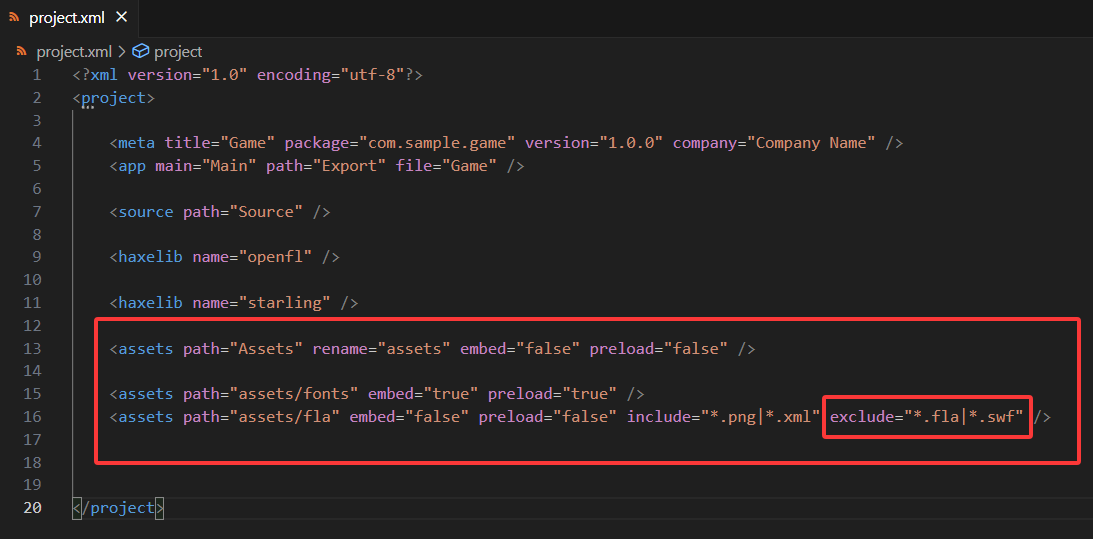
.

I loved using FlashDevelop. HaxeDevelop was the same program, just tuned more specifically for Haxe, whereas FlashDeveloped supported both AS3 and Haxe development.
It was a great IDE and it’s a real shame it’s discontinued. Even finding the last nightly releases is a bit tricky now, as the official websites for those were taken offline.
I’m on Linux these days, so I’m currently using VSCodium (also available on Mac and Windows). I’d comfortably recommend that, although I’m still not able to refactor code and such in the way I used to be able to to with FlashDevelop (but maybe I’ve not setup language support properly or something). It’s essentially Microsoft’s VS Code without the Microsoft closed-source elements, and their telemetry and tracking.
I’d also suggest installing @joshtynjala’s Feathers UI Extension Pack for it, which is a handy pack that adds support for Haxe, Lime/OpenFL and Feathers UI.
1 Like
Might you keep your .fla and .swf files in another folder, if they’re not supposed to be included in the build?
Just personally, I make a point to keep only things which are intended for the final build in the assets/ folder. As for why they’re being included in the final build when you’ve explicitly excluded them, is a question for someone with better understanding of how those things are managed.
My working files (which an .fla would be considered one of) would sit within a separate content/ folder.
1 Like
.
Git still hosts’ flash haxe develop ’
.
.
1 Like
.
Why doesn’t changing the viewport size respond?
.
Starling.current.viewPort = new Rectangle(0, 0, 1920, 1080); // No response?
.