Are you saying that your method above can parse multiple XML files simultaneously and use the correct order?
Do you believe that bitmap text can be exported?
I don’t think I saw an option to export bitmap text

Are you saying that your method above can parse multiple XML files simultaneously and use the correct order?
Do you believe that bitmap text can be exported?
I don’t think I saw an option to export bitmap text
Yes I am. Please, give it a go 
I’ve used this technique to import hundreds of spritesheets + XML files, containing animations that are scattered across them all.
Adobe Flash’s spritesheet export was only very basic, and it appears little has changed since being renamed to Adobe Animate, and the years since.
TexturePacker uses far more sophisticated algorithms to optimise your spritesheets. This means the rotation and order of assets within the spritesheets will get quite jumbled up! This is normal! When imported into Starling, the original order and rotation is maintained.
I don’t believe the bitmap text atlas (font-image + XML) can be generated by TexturePacker.
Will compressing textures with “ATF” affect the clarity and quality of images? Because I need to display high-definition images.
By the way, each of my ‘png’ sizes is different and requires anchor points to be set, but it seems difficult to set up anchor points? Do you need an image setup one by one? I feel that manual settings are not very accurate, right?
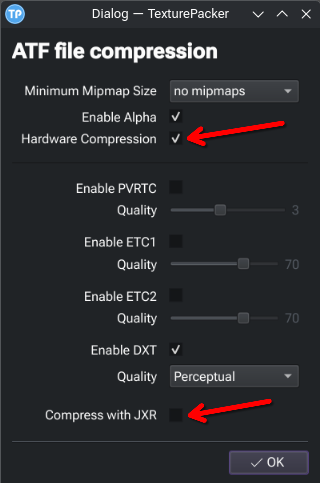
Be mindful that OpenFL (and therefore Starling for OpenFL) does not support JXR compression. You need to select “Hardware Compression” in TexturePacker’s ATF options, and make sure “Compress with JXR” is un-ticked.
For a specifically desktop target, which I believe you’ve mentioned yours is, you should only enable “DXT” compression. The others can remain un-ticked, as these are for various mobile targets.
Now in terms of quality, for the game assets you’ve given examples of here, I think you’ll be fine. But, ultimately you need to be the judge of that, so the proof will be in testing and your judgement.
The size and position of each texture in your spritesheet, once brought into Starling, will match the original file, such as your exported PNG sequences. For example, if your exported PNG sequence is 400x400px, then the resulting textures in Starling will be 400x400px. This is the case, even if TexturePacker tightly cropped each image to much less than that. The texture in Starling will match the size and positioning of the original PNG image.
As such, positioning your texture assets will largely depend on how you export them from Adobe Animate.
What I mean is how to set anchor points in “TexturePackerGUI”
If you select the sprite and go to “Sprite settings” (or double-click the sprite), options are available there.
However, you’ve identified a shortcoming of TexturePacker!
I was not aware of this, as I’ve always handled pivot points in code.
It seems TexturePacker has not included the pivotX and pivotY options for Sparrow / Starling spritesheets. I’ve confirmed this is still the behaviour on the latest version too.
Starling does parse this information from the spritesheet (see here), so this might need to be followed up with the TexturePacker dev.
We could probably create a custom template for TexturePacker to handle this, but I’ll need a bit of time for that.
TexturePacker does not support setting anchor points!
There’s no such method! “assetManager.addTextureAtlas”
The texture and position are all incorrect!
var assetManager:AssetManager = new AssetManager();
assetManager.enqueue([“qq/qq-0.png”, “qq/qq-0.xml”]);
assetManager.enqueue([“qq/qq-1.png”, “qq/qq-1.xml”]);
assetManager.enqueue([“qq/qq-2.png”, “qq/qq-2.xml”]);
assetManager.enqueue([“qq/qq-3.png”, “qq/qq-3.xml”]);
assetManager.loadQueue(function() {
var frames:Vector = assetManager.getTextures(“qq_frame_”);
		var mc:MovieClip = new MovieClip(frames, 12);
		mc.x = 200;
		mc.y = 200;
		addChild(mc);
		Starling.current.juggler.add(mc);

		mc.addEventListener(EnterFrameEvent.ENTER_FRAME, function() {
			// mc.rotation+=2;
		});
	});
It’s a method of starling.utils.AssetManager :
You’re perhaps using starling.assets.AssetManager. Try starling.utils.AssetManager instead to import the spritesheets.
(the two AssetManager classes is understandably confusing, I can’t tell why there are two)
This is an essential step, as the assetManager.addTextureAtlas() method is what makes sense of the spritesheets + XML.
I’ve sent off an email to TexturePacker support, to hopefully get the ball rolling on pivotX/Y support.
It's completely wrong, wrong!
var assetManager:AssetManager = new AssetManager();
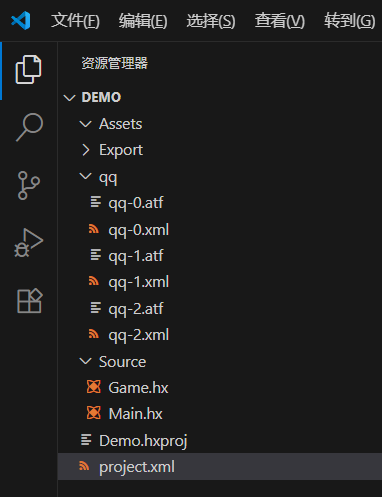
assetManager.addTextureAtlas(“qq-0”, new TextureAtlas(Texture.fromData(Assets.getBytes(“qq/qq-0.atf”)), Xml.parse(Assets.getText(“qq/qq-0.xml”))));
assetManager.addTextureAtlas(“qq-1”, new TextureAtlas(Texture.fromData(Assets.getBytes(“qq/qq-1.atf”)), Xml.parse(Assets.getText(“qq/qq-1.xml”))));
assetManager.addTextureAtlas(“qq-2”, new TextureAtlas(Texture.fromData(Assets.getBytes(“qq/qq-2.atf”)), Xml.parse(Assets.getText(“qq/qq-2.xml”))));
	Lib.setTimeout(function() {
		var mc:MovieClip = new MovieClip(assetManager.getTextures("qq_frame"), 12);
		mc.x = 200;
		mc.y = 200;
		addChild(mc);
		Starling.current.juggler.add(mc);
	}, 2000);
Demo.js:41983 Uncaught
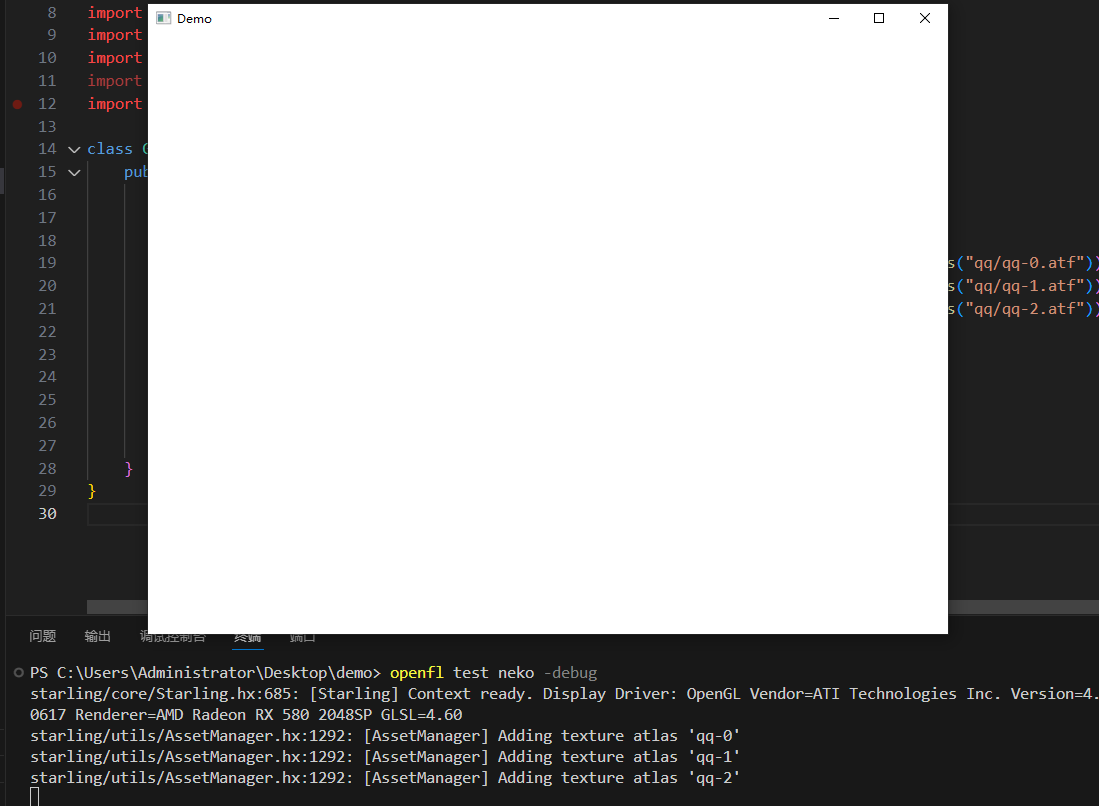
Can you share the output of:
openfl test neko -debug
And the <assets ... /> properties defined in your project.xml please?
PS C:\Users\Administrator\Desktop\demo> openfl test neko -debug
starling/core/Starling.hx:685: [Starling] Context ready. Display Driver: OpenGL Vendor=ATI Technologies Inc. Version=4.6.0 Compatibility Profile Context 25.8.1.250617 Renderer=AMD Radeon RX 580 2048SP GLSL=4.60
[openfl.display3D._internal.ATFReader] WARNING: Only ATF block compressed textures without JPEG-XR+LZMA are supported
Called from sys.thread.Lock::$statics line 1
Called from ApplicationMain::main line 26
Called from ApplicationMain::create line 137
Called from a C function
Called from lime.app.Application::exec line 150
Called from lime._internal.backend.native.NativeApplication::exec line 147
Called from a C function
Called from lime._internal.backend.native.NativeApplication::handleApplicationEvent line 174
Called from lime._internal.backend.native.NativeApplication::updateTimer line 593
Called from haxe.Timer::delay line 244
Called from openfl.display.Stage3D::__createContext line 394
Called from openfl.display.Stage3D::__dispatchCreate line 486
Called from openfl.events.EventDispatcher::dispatchEvent line 258
Called from openfl.events.EventDispatcher::__dispatchEvent line 478
Called from starling.core.Starling::onContextCreated line 686
Called from starling.core.Starling::initialize line 439
Called from starling.core.Starling::initializeRoot line 447
Called from a C function
Called from Game::$init line 14
Called from a C function
Called from Game::new line 19
Called from starling.textures.Texture::fromData line 206
Called from starling.textures.Texture::fromAtfData line 410
Called from starling.textures.ConcretePotTexture::uploadAtfData line 133
Called from openfl.display3D.textures.Texture::uploadCompressedTextureFromByteArray line 91
Called from openfl.display3D.textures.Texture::__uploadCompressedTextureFromByteArray line 312
Called from openfl.display3D._internal.ATFReader::readTextures line 126
Called from openfl.display3D._internal.ATFReader::__readUInt32 line 157
Called from openfl.utils.ByteArrayData::readUnsignedByte line 1505
Uncaught exception - End of file was encountered
PS C:\Users\Administrator\Desktop\demo>
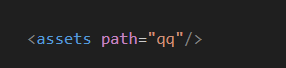
Make sure you’re not using JXR compression.
See my note here:
Check the asset manager for loaded assets:
trace(assetManager.getTextureNames());
Does this list your expected assets?
Check your movieClip for expected dimensions:
trace(mc.width, mc.height, mc.x, mc.y);
qq_frame_2,qq_frame_20,qq_frame_21,qq_frame_22,qq_frame_23,qq_frame_24,qq_frame_25,qq_frame_26,qq_frame_27,qq_frame_28,qq_frame_29,qq_frame_3,qq_frame_30,qq_frame_31,qq_frame_32,qq_frame_33,qq_frame_34,qq_frame_35,qq_frame_36,qq_frame_37,qq_frame_4,qq_frame_5,qq_frame_6,qq_frame_7,qq_frame_8,qq_frame_9]
Source/Game.hx:30: 512, 256, 200, 200
PS C:\Users\Administrator\Desktop\demo>