
Has the author of ‘openfl’ considered adding support for all options of ‘air SDK’ application descriptors to ‘openfl’?
Which options are you missing ?
Openfl “can use” air SDK “to package”. exe. apk “, but many” application descriptor options “packaged in” air SDK "are not supported!
maxD3D
Available: 33.1.1.929
This attribute is not supported!
Add many new “application descriptor options” to the “air SDK”,
Does’ openfl 'only support old options from the past?
Pay attention to the supported “air SDK” version numbers above
Has the author of ‘openfl’ considered adding full support for all ‘air SDK’ application descriptor options to ‘openfl’?
Direct3D 11 came out in 2009 and is supported since windows 7, the maxD3D option has litteraly no use nowadays : do you need it ?
Again, which options are you missing ?
MaxD3D “is a newly added option to” air SDK 33.1.1.929 “, which is Harman’s” SDK ",
I think ‘openfl’ only supports old options from the past,
Not supported for the options added to the new ‘air SDK’?
Even if it was added yesterday it simply has no use, don’t expect any OpenFL contributor to spend time adding this in.
But it’s all open source : if you want it so badly then add it and send a PR
It is unlikely that we will add additional AIR-specific options to the project.xml file format.
Instead, you can provide a custom AIR application descriptor template.
I’ve created a sample project that demonstrates how to do that:
I remember you sent me this content last time,
What I mean is that even with this method,
'maxD3D 'is also useless!
The Q&A of this post is based on your template method,
Even with your method ‘maxD3D’, it is not supported,
This is a new option, and there are many newly added options,
I feel that currently only old options are supported? Harman’s newly added option is not supported?
It is supported by using a custom descriptor template. There are many options in an AIR application descriptor that we don’t expose in the project.xml because they are specific to AIR and don’t make sense for other targets. The ability to provide custom template files is OpenFL’s supported way of customizing more advanced options for all targets.
I can’t see any way how this could be a bug in OpenFL. The application descriptor is copied directly into the Adobe AIR app. If you provided a valid custom descriptor file that contains maxD3D, then OpenFL won’t modify or remove the maxD3D value. If it doesn’t work in a AIR custom application descriptor for OpenFL, it also shouldn’t work if you were to create a similar descriptor in an AS3 AIR SDK project instead.
Even if we added to maxD3D to project.xml, it would set that value in the descriptor in the exact same place. If it doesn’t work with a custom descriptor template, it won’t work if we copy the value from project.xml either.
Maybe you added this value in the wrong section of the application descriptor template?. It should go in the <windows> element. In case it isn’t clear, that’s not the same element as <initialWindow>.
Based on the comments in this thread on GitHub from Andrew Frost at Harman, if you were to modify the custom template from the sample project that I linked above, this appears to be the where you would add the maxD3D value in my custom application descriptor:
<?xml version="1.0" encoding="utf-8" ?>
<application xmlns="http://ns.adobe.com/air/application/::AIR_SDK_VERSION::">
	<id>::APP_PACKAGE::</id>
	<versionLabel>::APP_VERSION::</versionLabel>
	<versionNumber>::APP_BUILD_NUMBER_SPLIT::</versionNumber>
	<filename>::APP_FILE::</filename>
	<name>::APP_TITLE::</name>
	<initialWindow>
		<content>::APP_FILE::.swf</content>
		<visible>true</visible>
	</initialWindow>
	<windows>
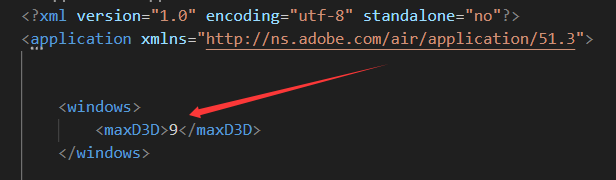
		<maxD3D>9</maxD3D>
	</windows>
</application>
Is that where you placed it? If so, then it seems like a bug in AIR. If not, then that hopefully means that we’ve found the issue in your project.
If you don’t think that it’s a bug in AIR, I recommend trying to create a pure AS3 project with a similar descriptor that demonstrates that maxD3D works with the AIR SDK and AS3, and I can try to figure out why OpenFL is removing or modifying the maxD3D value when it should not be.
If you have specific options that you think should be supported, we’d be happy to consider adding them, if we feel that it is appropriate for OpenFL and its various targets.
I said it from the beginning,
Is’ openfl air maxD3D 'not working?
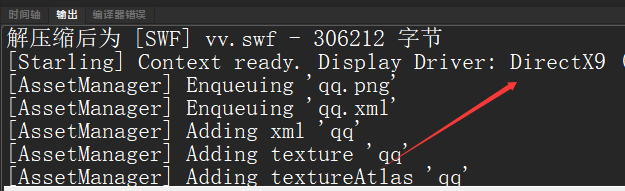
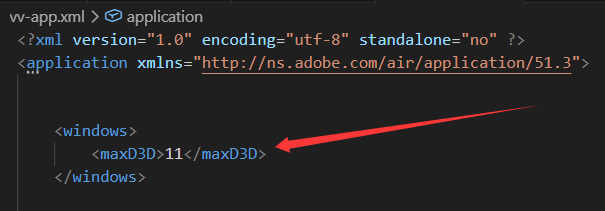
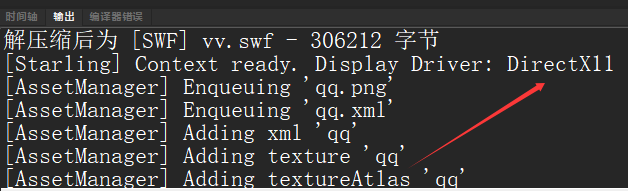
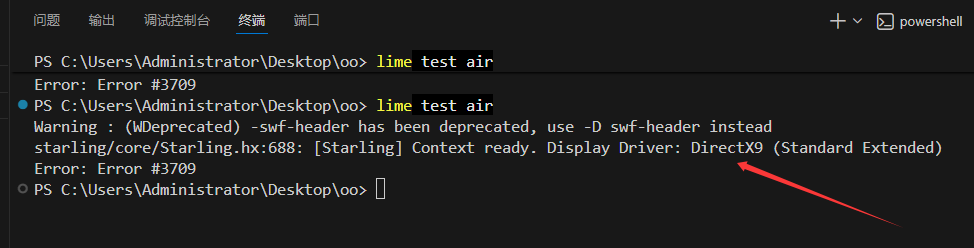
Regardless of whether ‘maxD3D’ is 9 or 11 in ‘openfl’, it always displays 9 at runtime
<?xml version="1.0" encoding="utf-8"?>
<project>

	<meta title="Oo" package="com.sample.oo" version="1.0.0" company="Company Name" />
	<app main="Main" path="Export" file="Oo" />

	<source path="Source" />

	<haxelib name="openfl" />
	<haxelib name="starling" />

	<assets path="textures" embed="false" preload="false" />

	<template path="custom-templates" />

</project>


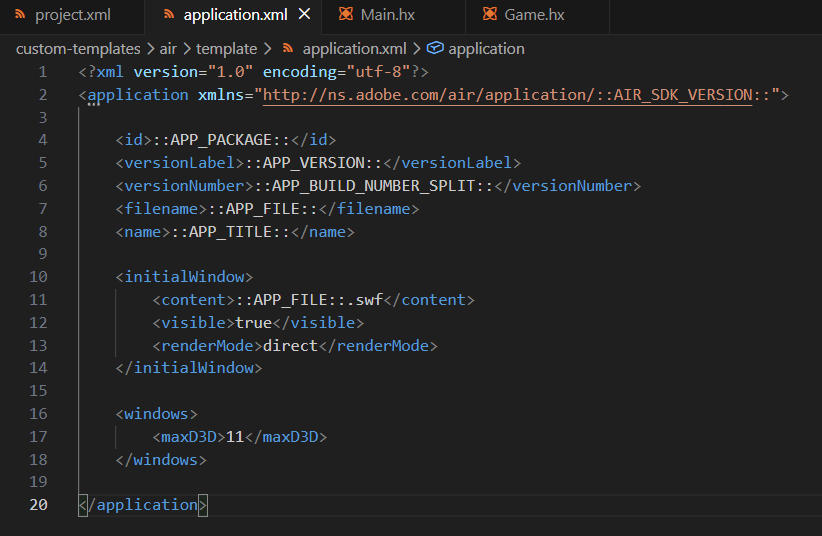
<?xml version="1.0" encoding="utf-8"?>
<application xmlns="http://ns.adobe.com/air/application/::AIR_SDK_VERSION::">

	<id>::APP_PACKAGE::</id>
	<versionLabel>::APP_VERSION::</versionLabel>
	<versionNumber>::APP_BUILD_NUMBER_SPLIT::</versionNumber>
	<filename>::APP_FILE::</filename>
	<name>::APP_TITLE::</name>

	<initialWindow>
		<content>::APP_FILE::.swf</content>
		<visible>true</visible>
		<renderMode>direct</renderMode>
	</initialWindow>

	<windows>
		<maxD3D>11</maxD3D>
	</windows>

</application>
your code goes here
your code goes here
your code goes here
I’d be curious to see what the final generated application descriptor .xml file contains for the ::AIR_SDK_VERSION:: token. It may need to be a newer value like 50.0 or 51.0. Even if you are using AIR SDK 50 or 51, it’s important to check whether this value is different or not. Off the top of my head, I don’t remember what actions Lime performs to detect that value from the AIR SDK, but it’s also possible that you may need to configure it manually.
Additionally, it is worth considering that the maxD3D property is ignored unless the SWF version is set to a high enough value. The AIR SDK should automatically set an appropriate swf-version compiler option for AS3 for itself. However, when you compile with Haxe, you may need to set its --swf-version option in your project.xml. I could be wrong, but part of me seems to recall that Haxe might not properly support newer SWF versions after AIR 32.0. The Flash target is still maintained in Haxe, but not at the same level that it was in the past. If the swf-version cannot be set high enough, then the Haxe compiler may need a pull request to add new swf versions.
I am using ‘AIRSDK_51.3.2.2’
It appears that the ::AIR_SDK_VERSION:: value defaults to 32.0, regardless of which SDK version that you are actually using.
<config:air sdk-version="51.3"/>
You should try to add that to your project.xml to see if it makes a difference.
It appears that the swf-version value defaults to 17 for OpenFL, regardless of which SDK version that you are actually using. This is for AIR SDK 17, which is mxmlc swf-version 28. For AIR SDK versions below 50, you must specify the exact AIR SDK version when specifying the Haxe swf-version compiler option.
While Haxe and mxmlc both have an option named swf-version, they don’t mean the same thing.
Many years ago, in Flash/AIR’s past, the Flash Player and AIR SDK versions fell out of alignment with the mxmlc swf-version argument. In Flash Player 10.2, the mxmlc swf-version was increased to 11 because it is an integer, and Adobe wanted to add new features in the 10.2 release. After that, there were several 11.x releases that each increased the mxmlc swf-version by 1. Ultimately, Flash Player and AIR 12 ended up at mxmlc swf-version 23, which is is a difference of 11. But then Adobe started increasing the major version with every update again, so it kept the difference of 11 going forward for many years.
Haxe’s compiler expects its swf-version option to match the Flash Player and AIR version. It then internally maps to the mxmlc swf-version value. If the Flash/AIR version is >= 12, it simply adds 11.
However, when Harman suddenly bumped the AIR SDK version number from 33.1 to 50.0, they also set the mxmlc swf-version to 50, so that they would match again. In the AIR SDK, the offset of 11 is no longer in effect for AIR 50+.
The Haxe compiler has not updated its algorithm to account for AIR 50+, though. Haxe still expects a difference of 11 between Flash/AIR versions and the mxmlc swf-version.
To calculate the Haxe swf-version for AIR SDK 50+, you must subtract 11. So, for AIR 51, you get 51 - 11 = 40. So if you want to be sure that your compiled SWF is targeting AIR 51, you add this to your OpenFL project.xml file:
<app swf-version="40"/> <!-- AIR 51 = 40 + 11 -->
Haxe thinks that you are targeting AIR 40, which does not exist. But you are actually targeting AIR 51. It’s confusing, but that’s how it works.
To summarize my previous two posts, I think that you should try adding the following to your OpenFL project.xml. It may help to make maxD3D work as you expect.
<config:air sdk-version="51.3"/>
<app swf-version="40"/>
1 Like