
I just tried the ‘Nape Physics Engine’ and it compiled successfully without encountering any errors or warnings
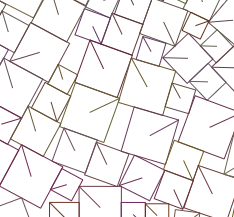
“project.xml“:
<?xml version="1.0" encoding="utf-8"?>
<project>

	<meta title="Hnn" package="com.sample.hnn" version="1.0.0" company="Company Name" />
	<app main="Main" path="Export" file="Hnn" />

	<source path="Source" />

	<haxelib name="openfl" />
	<haxelib name="nape-haxe4" />

</project>
“Main.hx“:
package;

import nape.space.Space;
import nape.geom.Vec2;
import nape.phys.Body;
import nape.phys.BodyType;
import nape.phys.Material;
import nape.shape.Polygon;
import nape.util.ShapeDebug;
import openfl.display.Sprite;
import openfl.events.Event;
import openfl.events.MouseEvent;
import openfl.Lib;

class Main extends Sprite {
	private var space:Space;
	private var debug:ShapeDebug;
	private var lastTime:Float;
	private var arr:Array<Body> = [];
	private var ii:Int = 0;

	public function new() {
		super();

		var gravity:Vec2 = new Vec2(0, 400);
		space = new Space(gravity);

		var groundBody:Body = new Body(BodyType.STATIC, new Vec2(stage.stageWidth / 2, stage.stageHeight - 10));
		var groundShape:Polygon = new Polygon(Polygon.box(stage.stageWidth, 30));
		groundBody.shapes.add(groundShape);
		groundBody.space = space;

		var groundBody2:Body = new Body(BodyType.STATIC, new Vec2(0, stage.stageHeight / 2));
		var groundShape2:Polygon = new Polygon(Polygon.box(30, stage.stageHeight));
		groundBody2.shapes.add(groundShape2);
		groundBody2.space = space;

		var groundBody3:Body = new Body(BodyType.STATIC, new Vec2(stage.stageWidth, stage.stageHeight / 2));
		var groundShape3:Polygon = new Polygon(Polygon.box(30, stage.stageHeight));
		groundBody3.shapes.add(groundShape3);
		groundBody3.space = space;

		debug = new ShapeDebug(stage.stageWidth, stage.stageHeight);
		debug.thickness = 1;
		addChild(debug.display);

		stage.addEventListener(MouseEvent.MOUSE_DOWN, onMouseDown);
		addEventListener(Event.ENTER_FRAME, function(_) {
			ii++;
			if (ii < 300) {
				onMouseDown(null);
			}
		});
		addEventListener(Event.ENTER_FRAME, loop);
		lastTime = Lib.getTimer();
	}

	private function onMouseDown(e:MouseEvent):Void {
		var body:Body = new Body(BodyType.DYNAMIC, new Vec2(Math.random() * stage.stageWidth, 100));
		var size:Float = Math.random() * 30 + 20;
		var shape:Polygon = new Polygon(Polygon.box(size, size));

		arr.push(body);
		body.shapes.add(shape);

		var material:Material = new Material();
		material.elasticity = 0;
		shape.material = material;
		body.space = space;
	}

	private function loop(e:Event):Void {
		space.step(1 / 30, 10, 10);
		debug.clear();
		debug.draw(space);
	}
}
Someone may have asked, didn’t you say before that there were a large number of errors during the compilation of ‘nape’ that caused compilation failures? My answer is yes
But I must declare that I previously used ‘haxelib install nape’ and installed ‘2.0.20’
haxelib: nape (2.0.20)
This version of ‘nape’ does indeed encounter a large number of errors during compilation, resulting in compilation failures
Perhaps everyone has already arrived. I am currently using “Nape 2.0.22”
haxelib: nape-haxe4 (2.0.22)
This version of the ‘nape’ physics engine can compile successfully without errors or warnings during compilation
install:haxelib install nape-haxe4 2.0.22
Don’t forget to use:
<haxelib name="nape-haxe4" />
Thank you for the recommendation, thank you to all contributors, thank you everyone