Is there a way to get a sharp border around a TextField using filters?
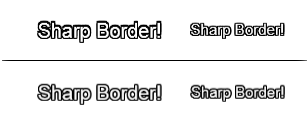
In the example image below:
- The first row shows 8
TextFieldinstances moved by ±1 pixel from the main text to create a border effect which is a bit overkill - The second row uses only a DropShadow filter, but the result isn’t as sharp.
Maybe SDL3 supports something like this?
Here’s my code below:
public function new() {
var text1 = createLayeredBorderText("Sharp Border!", 100, 100);
addChild(text1);
var text2 = createSharpDropShadowBorder("Sharp Border!", 100, 150);
addChild(text2);
}
private function createLayeredBorderText(content:String, x:Float, y:Float):Sprite {
		var container = new Sprite();
		container.x = x;
		container.y = y;

		var format = new TextFormat();
		format.font = "Arial";
		format.size = 12;

		var offsets = [
			{x: -1, y: -1},
			{x: 0, y: -1},
			{x: 1, y: -1},
			{x: -1, y: 0},
			{x: 1, y: 0},
			{x: -1, y: 1},
			{x: 0, y: 1},
			{x: 1, y: 1}
		];

		for (offset in offsets) {
			var borderTxt = new TextField();
			borderTxt.text = content;
			borderTxt.x = offset.x;
			borderTxt.y = offset.y;
			format.color = 0x000000;
			borderTxt.setTextFormat(format);
			borderTxt.autoSize = TextFieldAutoSize.LEFT;
			borderTxt.selectable = false;
			container.addChild(borderTxt);
		}

		var mainTxt = new TextField();
		mainTxt.text = content;
		format.color = 0xFFFFFF;
		mainTxt.setTextFormat(format);
		mainTxt.autoSize = TextFieldAutoSize.LEFT;
		mainTxt.selectable = false;
		container.addChild(mainTxt);

		return container;
	}

private function createSharpDropShadowBorder(content:String, x:Float, y:Float):TextField {
		var txt = new TextField();
		txt.text = content;
		txt.x = x;
		txt.y = y;

		var format = new TextFormat();
		format.font = "Arial";
		format.size = 12;
		format.color = 0xFFFFFF;
		txt.setTextFormat(format);

		txt.autoSize = TextFieldAutoSize.LEFT;
		txt.selectable = false;

		var filters:Array<BitmapFilter> = [
			new DropShadowFilter(1, 0, 0x000000, 1, 0, 0, 1, 3, false, false, false), // Right
			new DropShadowFilter(1, 180, 0x000000, 1, 0, 0, 1, 3, false, false, false), // Left
			new DropShadowFilter(1, 90, 0x000000, 1, 0, 0, 1, 3, false, false, false), // Down
			new DropShadowFilter(1, 270, 0x000000, 1, 0, 0, 1, 3, false, false, false) // Up
		];

		txt.filters = filters;

		return txt;
	}