
Regarding the packaging support for “Air SDK”?
I know you can use ‘air SDK’ to publish ‘. exe. apk’
Is the configuration of the ‘air SDK’ fully supported?
Air SDK configuration instructions:
I would like to know if all configurations of the ‘Air SDK’ are supported?
Why not support it?

The prefix “config” for element “config:air” is not bound.
You can provide a custom AIR application descriptor XML file as a template for OpenFL to use. I’ve created a sample project.
I have created a ‘DisplayingABitmap’ for testing, which is great. This is exactly what I need. Thank you for your contribution
“openfl create DisplayingABitmap”
“project.xml“:
<?xml version="1.0" encoding="utf-8"?>
<project>

	<meta title="Displaying a Bitmap" package="org.openfl.samples.displayingabitmap" version="1.0.0"
		company="OpenFL" />
	<app main="Main" path="Export" file="DisplayingABitmap" />

	<source path="Source" />

	<haxelib name="openfl" />

	<assets path="Assets" rename="assets" />

	<template path="custom-templates" />

</project>

Pay attention to the file path:
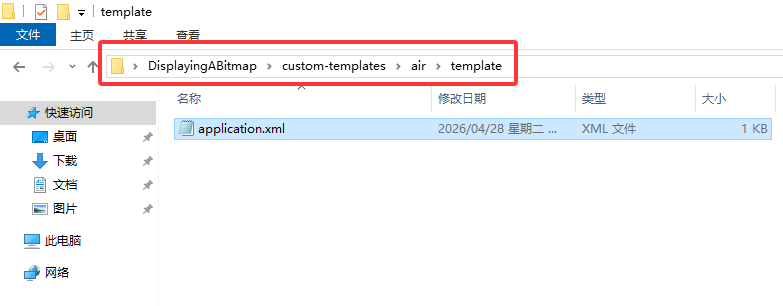
“application.xml“:
<?xml version="1.0" encoding="utf-8"?>
<application xmlns="http://ns.adobe.com/air/application/::AIR_SDK_VERSION::">

	<id>::APP_PACKAGE::</id>
	<versionLabel>::APP_VERSION::</versionLabel>
	<versionNumber>::APP_BUILD_NUMBER_SPLIT::</versionNumber>
	<filename>::APP_FILE::</filename>
	<name>::APP_TITLE::</name>

	<initialWindow>
		<content>::APP_FILE::.swf</content>
		<title>Example Window Title</title>
		<visible>true</visible>
		<minSize>800 600</minSize>
		<maxSize>1920 1080</maxSize>
	</initialWindow>

</application>
I put the ‘application. xml’ file in the project root directory, why didn’t it work? Because I don’t want to nest so many folders
<template path="application.xml" />
When you want to override one of Lime’s templates, you must use the same path as Lime does. You cannot move it somewhere else. In this case, the original file is at air/template/application.xml, so that’s where you need to place it in your custom templates directory.
For reference, here the application.xml template in Lime. If you open the link, you can see the path above the code. Or you can look at the address bar to see it as well.
That means the location cannot be changed, thank you for your response.
May I ask what the two colons on the left and right sides of ‘id’ mean? “:”?
<id>::APP_PACKAGE::</id>
Does the custom ‘application. xml’ override the built-in ‘application. xml’ in ‘lime’?
Lime uses Haxe’s template system to automatically populate certain values in the file.
For example, the application.xml template has <width>::WIN_WIDTH::</width>. The ::WIN_WIDTH:: value is replaced by the window width set in your project.xml.
If project.xml contains <window width="800"/>, then the application.xml generated from the template will contain <width>800</width>.
To specifically address the one that you asked about, I think that ::APP_PACKAGE:: is populated from the value of <meta package="com.example.myapp"/>.
@joshtynjala Not replacing the entire file, but replacing certain assignments within the file?
I would like to provide feedback on the issue,
Does’ maxD3D 'seem unsupported?
maxD3D
(optional)
Available: 33.1.1.929
Sets a limit on the Direct3D APIs used by the AIR runtime on Windows. If this value is set, it should be an integer value and AIR will not use a Direct3D version higher than this value. Currently this means that to force the runtime to use Direct3D 9, it can be set to 9, and to prevent the runtime from using Direct3D, it can be set to 0. The default for new SWFs is Direct3D 11.
I have never used this maxD3D option, so I can’t help you with it.