
By the way, will the latest version of “TexturePackerGUI” add support for “atf” again? Have you explained to the developer of “TexturePackerGUI”?
I’ve been away (camping), so sorry for the time it took to reply to you.
I can’t speak on behalf of the OpenFL / Starling team, but if your key objective is to have the widest range of support, then PNG is going to provide you that, having reliably 100% support on OpenFL targets.
The only instance that comes to mind where PNG may no longer offer the widest range of support, is if you’re application holds a large amount of textures within GPU memory, to the extent that it may no longer run on some devices due to GPU memory limitations. That is where the key benefit of a format that supports GPU texture compression is, such as ATF.
On a few occasions, I have gently raised re-introducing ATF texture support into TexturePacker with the developer. I’m told that based on the analytic data TexturePacker collects, there wouldn’t appear to be a pressing need for it within the OpenFL / AIR / Starling communities.
It’s times like that I perhaps regretted disabling analytics 
I guess all I can say to everyone is, if you use legitimately TexturePacker 6.0.1 with ATF, ensure you have analytics enabled and just maybe the developers will see a need to re-introduce support for that format.
This was one of the key reasons I was keen to introduce KTX support, to provide an alternative to ATF in use cases where its viable.
2 Likes
Looks like I have already data collection but maybe they’re ignoring older version analytics 
Good evening, nice to see your reply. Thank you.
Good morning, by the way, modern graphics cards have a lot of memory. Why do people still compress textures to save graphics card memory? I feel that even without compressing textures, modern graphics card memory is sufficient, right?
I’d agree, that GPU memory availability has improved a lot since Adobe first introduced the ATF format around 2011. Back then, flagship GPU’s had only 1.5GB memory, such as the GeForce GTX 580. Compare that to the current flagship GeForce RTX 5090 which has a whopping 32GB.
It would indeed be a challenge to legitimately fill that using nothing more than 2D textures. That’d be 128 PNG 8192x8192 textures, which is a huge amount. For perspective though, if using DXT5 GPU texture compression the same number of textures consume just 8GB of VRAM.
There are some realities to consider:
- Who can afford a GeForce RTX 5090? The starting price for those here is over AU$4,040 (US$2,636 / CN¥18,676)
- Based on Steam’s November 2025 hardware survey, only 0.59% of users have 32GB of VRAM. Most users (33.36%) have 8GB of VRAM, which is a good amount. However a sizeable portion of users (14.93%) still have 4GB of VRAM or less.
- We don’t typically have the luxury or targeting the latest flagship hardware. Rather, development is more typically restricted by the oldest supported hardware. With 8.06% of Steam users using a GPU that has 2GB or less VRAM, a developer needs to make a choice: Do we try to support them or not? 2GB of VRAM equates to (without accounting for system overheads):
- 8 PNG 8192x8192 textures.
- 32 DXT5 8192x8192 textures!
- The GPU VRAM is a shared resource, so you can not assume it is 100% available to you. For instance, the operating system and other applications, notably web browsers and electron apps, consume GPU VRAM. My aim has been to consume no more than half of my target platform’s available VRAM.
Now the solution isn’t necessarily GPU texture compression. Perhaps it’s loading and unloading textures between parts of the game, or using lower resolution textures, but those are trade-offs still in terms of game performance (load times), and texture quality (low res textures).
GPU texture compression in many instances, is a simple way of improving texture upload performance and increasing your application’s GPU compatibility threshold, with minimal trade-off.
To your specific point though, you might be right. This is something you’d assess on a per-project basis. If your project isn’t using more than say 512MB VRAM with uncompressed/PNG textures, then it’s a pretty safe bet you don’t need GPU texture compression.
If your project needs more than that, then perhaps you need to start considering what hardware is no longer going to be supported, and whether or not that’s a concern, and if it is, how you might address it.
May I ask if compressing textures will affect the image quality during display, as I need to display high-quality images? Thank you
It seems that ATF is not universal, so have you found a compression method that can be used in OpenFL?
All GPU texture compression formats are lossy as far as I’m aware. That means there is a loss of quality, but whether or not it’s perceptible, varies. I’d suggest testing this and confirming for yourself based on your expectations.
Can you elaborate what you mean by “not universal”?
Translation error,
I mean,
ATF is not universal
Translation error,
I mean,
ATF does not support use in all systems and all targets
I only realized from what you said that ATF is lossy and the quality will decrease. It is indeed necessary to observe the display effect by myself. I have not yet used compressed textures. Maybe it will be used in the future, so ask in advance
No I think the translation was ok. Before responding though, I hoped you might clarify what you’re referring to with that. There was a noted support issue with ETC2, but that has been addressed in the upcoming 9.6.0 version. With that addressed, I’d hope the gaps have been filled? If there’s another issue you’re aware of, let the OpenFL team know.
I’ve been using DXT5 compression on live projects for years. I can’t recall an instance where the texture compression was perceptible to the point it was an issue. It’s worth noting that the applications I developed were often displayed on huge LED walls, or multi-screen videowalls, so visually huge.
However, that’s my scenario.
Your needs and expectations may be different, and so you’d need to test for yourself. If the GPU texture compression quality loss is noticeable in-game and not acceptable, then that’ll be a defining project requirement: no GPU texture compression.
Here’s what I can offer from my existing tests.
Note the cat_run_png image on the bottom there. That represents the lossless quality version. With respect to the ATF format, the cat_run_atf-dxt5 version in the top-right is the desktop GPU texture compression format for comparison.
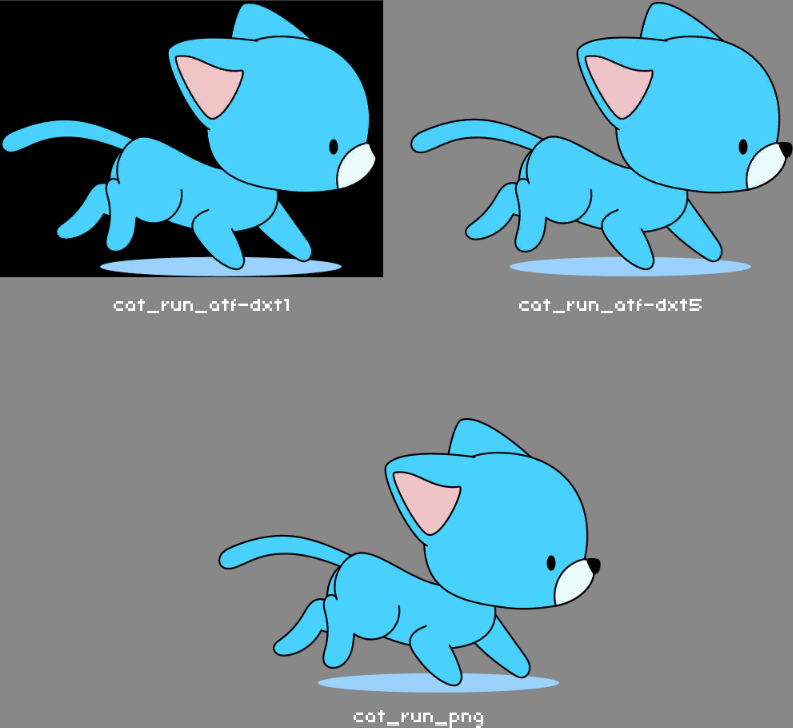
Remember last time, I couldn’t display the ATF texture when testing on Windows H5!
Ah, this one?
You resolved that in the next post by specifying DXT only.
But, perhaps what you’re now asking is whether or not a single ATF file can support all targets (iOS, Android, desktop, HTML5, etc), in which case specifying DXT only (essentially desktop only), would not be a solution.
I suggest trying ETC2 and DXT only. This should be compatible with any reasonably modern desktop and mobile hardware.
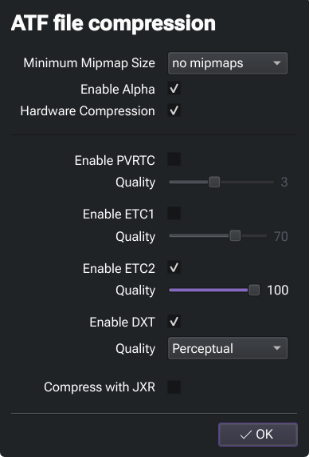
In my testing, the issues arise once ETC1 is also added, but if your project requires alpha, this shouldn’t be used anyway as that codec doesn’t support alpha. If you want to be able to support iOS devices older than 2014, you might also enabled PVRTC.
In an oversimplified nutshell:
- DXT5 is supported by all common desktop OS’ since 2009.
- ETC2 is supported by all common mobile devices since 2014.
Are you requiring pre-2014 mobile device support?
Please also keep in mind ETC2 support was fixed in 9.6.0-dev. This is what I was using when I tested the above.
To pull that version of OpenFL onto your system, use:
haxelib git openfl https://github.com/openfl/openfl.git 9.6.0-dev
You can then confirm it is active by running:
haxelib list
As an example of the output to expect, the square brackets around [git] indicate it is the active version, not 9.5.0:
openfl: 9.5.0 [git]
What I’m talking about is the issue of “ETC2” support. Currently, openfl is still 9.5 and “ETC2” is not yet supported! Is the 9.6 version you mentioned above a beta version?