[I have also also asked a similar question in the Haxe UI forum]
Apologies for the long post – my questions require some context, and are somewhat open ended “shopping list” questions because I am a newbie to Haxie.
I am building a (non game) app to render S-57 navigation charts. The app has two distinct parts:
a regular UI with dialogs, buttons, text fields, etc
a (somewhat) low level vector based renderer to show the charts (the charts are all vector based, so not tiles, but polygon, line, and point geometries)
The chart renderer:
doesn’t have to be blazingly fast – I can maybe (?) live with 30-45fps
does need to be embedded within the app as some sort of drawable surface (so not in a separate window – think of a Canvas node in Swing/JavaFx/HTML)
From my reading it seems like I could do the regular UI part in Feathers UI and the low level stuff in OpenFL?
But I am not sure how the embedding of the chart renderer part will work. I have done this kind of thing in other UI toolkits before, doing one of two things:
using a “canvas-like” widget provided by the toolkit, which usually doesn’t give great performance because the “canvas” is too far abstracted from the GPU (e.g. usually uses (semi) immediate mode rendering, can’t do things such as OpenGL-like indirect rendering, shaders, etc).
hacking together two UI rendering loops, one for the UI part and one for the low level renderer (and this is always ugly-as and fragile).
But maybe there is some sort of “drawing surface” in OpenFL that can be embedded in a regular Feathers UI, and is either fast by default, or allows access to low level rendering techniques? And presumably hook into some sort of WebGL back-end for the browser? Or perhaps Starling provides something like this?
Also small questions – does Open FL/Feathers UI:
use a scene graph approach to creating UIs? (I think it does …)
allow CSS skinning of components? (I think it does …)
have good text rendering? (a lot of UI toolkits do a poor job of this)
have a reactive streams library like RxJava or ReactFX?
Finally where do Ceramic, SDL and Heaps fit into the UI picture in Haxie?
Hi @commonwomble
I’m currently working on a Feathers app which has a similar requirement for a drawing area. I discovered that if you extend the ProgrammaticSkin class and then override its update() function you can add any OpenFL objects or use the graphics class for drawing. You would then use it as the background skin for a LayoutGroup which contains your overlaid UI controls. It sounds like you may want to explore the “filters” feature in OpenFL for low-level effects.
For your other questions,
I’m not sure about the scene graph question
Feathers allows skinning but not through CSS. If you want CSS maybe look at HaxeUI.
Text rendering is pretty good IMHO. OpenFL has built-in font conversion which is nice.
You may be interested in the Tinkerbell set of tools, which includes tink_streams.
Ceramic, SDL, and Heaps would be alternatives to OpenFL. Heaps is fairly active IMHO (mostly for games) and the others not used as much in the Haxe world but I’m sure they have their strengths.
Any idea how fast the OpenFL graphic class if for drawing? And btw what is it called?!
I am drawing say 40K polygons per frame, which after triangulation runs to a few 100K triangles per frame (and this number will grow). In OpenGL that is a breeze, but most Canvas/Graphics style widgets in higher level toolkits that I have used in the past can’t render that at more than 30fps.
And I actually mean drawing them – each frame cannot re-use stuff from the previous frame sadly.
Tinkerbell streams looks interesting Thanks for that tip.
And as for the skinning, I shouldn’t have said “in CSS”. As long as you can skin apps that will work.
Drawing 100K triangles is probably going to work best with Stage 3D, which is sort of similar to OpenGL ES, and is available as part of OpenFL. Stage 3D may be combined with other OpenFL content, including Feathers UI. However, Stage 3D is always below other content that isn’t also part of Stage 3D, so that’s a limitation to keep in mind.
Starling is built on Stage 3D, so you may find that it’s higher level abstractions are easier to work with, while still being fast enough. I know that it has a Mesh class that can be used for drawing triangles, for instance.
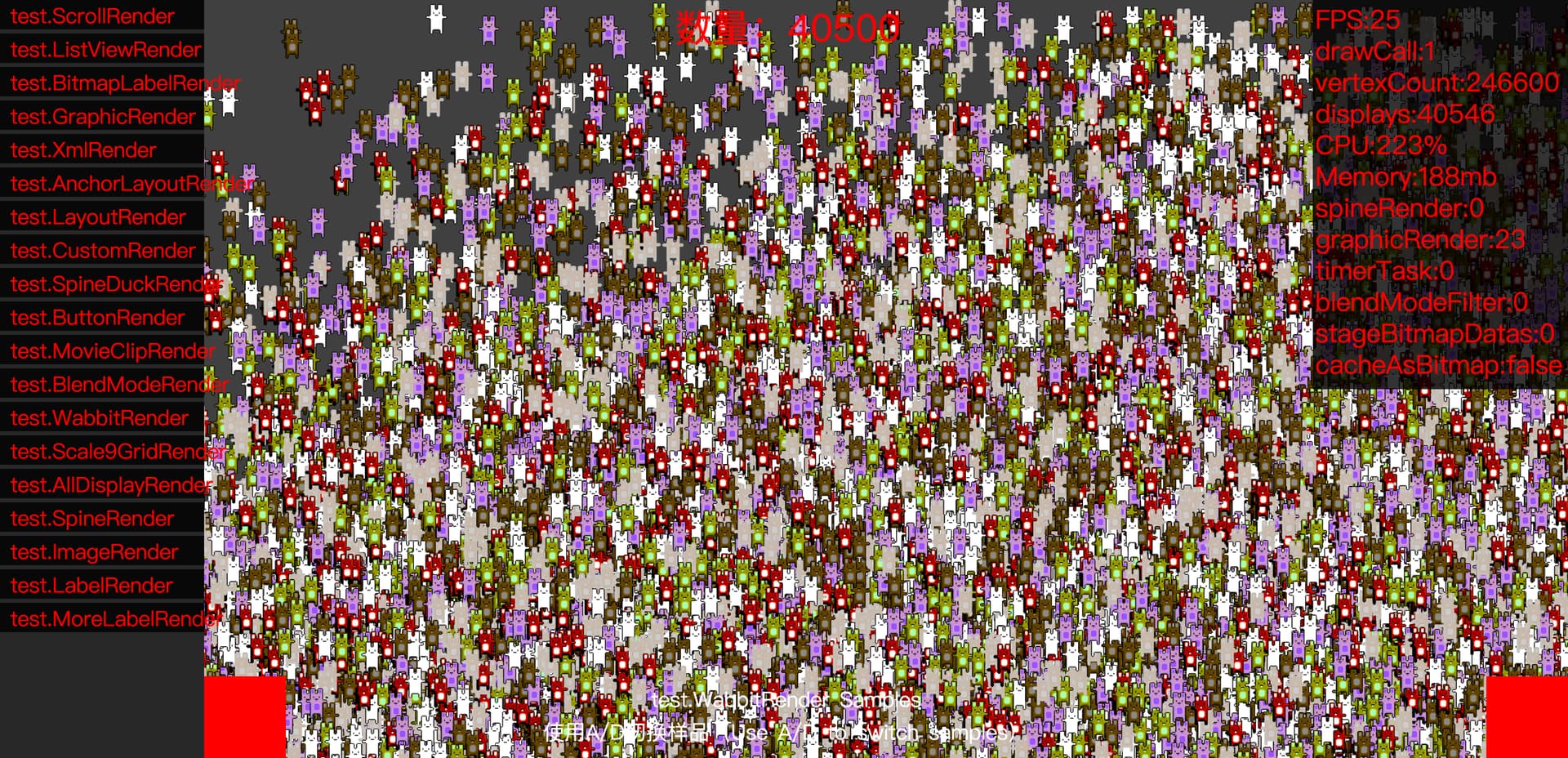
A game engine or framework that has not yet been released? Similar to Startling and Filxel, it is now based on rendering on OpenFL. Its advantage is that it defaults to using a multi texture rendering engine.
You can notice the number of drawcalls in the image above. Even if there are objects such as text blocks, rabbits, etc., only 1 drawcall is needed. It can render up to 16 textures simultaneously (the number supported varies depending on the device).
What does “below” mean here? Are you saying that for example if I had a Feathers widget overlapping my Stage3D content, that the Feathers widget would always appear in front of the Stage3D content? What would happen if the Feathers widget were partly transparent (say opacity 0.4)?

 Thanks for that tip.
 Perhaps it hasn’t met expectations yet.