Novice learning 'Starling' discussion

Try adjusting your BitmapFont’s smoothing property.

// Pick one
bitmapFont.smoothing = TextureSmoothing.BILINEAR;
bitmapFont.smoothing = TextureSmoothing.TRILINEAR;
bitmapFont.smoothing = TextureSmoothing.NONE;

See the discussion here:

From the Starling manual’s Distance Field Rendering section:

As mentioned multiple times, bitmap fonts are the fastest way to render text in Starling. However, if you need to display text in multiple sizes, you will soon discover that bitmap fonts do not scale well. Scaling up makes them blurry, scaling down introduces aliasing problems. Thus, for best results, one has to embed the font in all the sizes used within the application…

Did you use a plugin? It doesn’t appear to provide bitmap font support natively.

您提到的这种方法,我感觉不行!
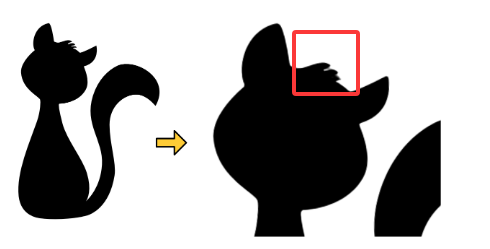
我认为实现起来麻烦,其次是像下面说的有“瑕疵”

应用这种样式后,即使在高比例值下,纹理也能保持完美清晰。

只有在非常精细的区域(比如Seven的发型)周围才能看到小的瑕疵。

“createjs”有内置的“位图字体类”,且可以从“adobe animate”导出“位图字体”。
“发光描边滤镜”,“每个字符不一样的颜色”都支持,

到了“starling”,我认为始终没有理想的“位图字体”制作工具,
这些位图字体制作工具达不到在“adobe animate”中可以实现的效果。

且竟然使用一种古老的“fnt”格式…

我认为“openfl starling”应该参考更多的库框架和引擎中的优势特性,持续开发新功能。
是更多功能可以简单使用。

Ah。 Ha ha ha.

I think I have found a solution.

Because the text of ‘starling’ is drawn as a texture map, scaling the texture map causes blurring.

So, I calculate the size of the text based on the scaling of the container UI

Even with the container UI scale, the following code can ensure “clear and refined text”

By using this method, I obtained “clear and refined” text

This is my current solution,
Can you see if it will cause other problems?

// node.addChild(txt);
// txt.parent = node;

node.scale += 0.01;

txt.scale = 1 / node.scale;
txt.format.size = txt.format.size * node.scale;

.
Can you please discuss the issue of contour hardness for “GlowFilter”
.
A friend once replied to me saying that the transparency value of “GlowFilter” should not exceed 1, but “html5” worked for some reason.
.
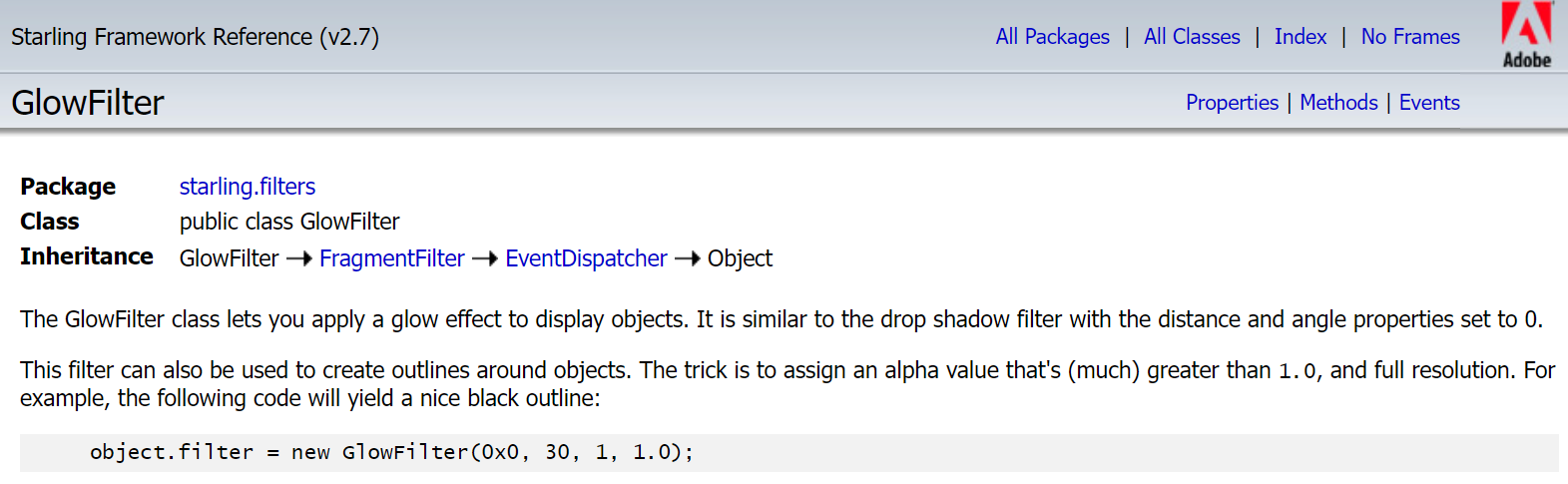
I just looked at the ‘Starling API’ and the documentation suggests that we do this if we need to implement hard tracing.
.


.
This filter can also be used to create outlines around objects. The trick is to assign an alpha value that’s (much) greater than 1.0, and full resolution. For example, the following code will yield a nice black outline:
.
object.filter = new GlowFilter(0x0, 30, 1, 1.0);
.
“starling api”, The transparency of the case has been increased to 30 to obtain hardness strokes
.

.
I am currently using this method as well
.

Support is on its way into the official release of TexturePacker @785597448 :wink: :+1:

Does the official TexturePackerGUI already support starling anchors?

No, not yet, but it’s in development :+1:

@Bink
@joshtynjala

The GlowFilter class lets you apply a glow effect to display objects. It is similar to the drop shadow filter with the distance and angle properties set to 0.

This filter can also be used to create outlines around objects. The trick is to assign an alpha value that’s (much) greater than 1.0 , and full resolution. For example, the following code will yield a nice black outline:

object.filter = new GlowFilter(0x0, 30, 1, 1.0);

Set ‘alpha’ to ‘30’,
This can achieve a ‘hard contour tracing’,
I would like to ask how this effect is achieved internally,
Have multiple filters been used?

How is this effect achieved internally?
Have multiple overlay filters been used to achieve this?

@Bink
@joshtynjala

values > 1 will make it stronger, i.e. produce a harder edge.

How is this effect achieved internally?
Have multiple overlay filters been used to achieve this?

@Bink
@joshtynjala

alpha property

alpha:Number

The alpha value of the glow. Values between 0 and 1 modify the opacity; values > 1 will make it stronger, i.e. produce a harder edge.

The default value is 1.0.

This steps into GPU shader assembly, which is another world, and may as well be a foreign language to me :sweat_smile:

From what I can understand of it though, the starling.filters.CompositeFilter class which the GlowFilter is leveraging, does not clamp the alpha value, so values higher than 1.0 are possible, and even useful.

What’s pushed to the fragmentShader, is the colour value multiplied by the alpha, which I guess when greater than 1.0 in shader land, simply increases intensity.

No.

Does anyone still use ‘starling’ to develop games?

Had a look here?

Or here?
https://steamdb.info/tech/Engine/Lime_OR_OpenFL/

Or here?
https://steamdb.info/tech/Engine/Adobe_AIR/

I’m not sure how many of those might use Starling specifically though.

There’s also here, but I’m not sure this list is as active as it once might have been:

The restaurant web game at the top of the list is one example of Haxe/OpenFL/Starling though.

Have a look at this one, it looks awesome:

It’s made using OpenFL, Starling and Nape for the physics.

1 Like

By the way, is the current screen resolution of computers starting at “1920x1080”?

I’m asking, does the current screen resolution of computers start with>=“1920x1080”?

AI told me that the screen resolution of 50% for Steam players is mainly based on 1920x1080. Can I directly use 1920x1080 for the design resolution?

For desktop computers, yes I’d consider that the most common resolution for games, based on the current Steam survey results.

The web / HTML5 target complicates that a bit though, if the intention is for the same app to be playable on both desktop and mobile.

Something that’s quite common in games though, much like Roof Rage above, is preserving that vintage pixel effect.

That can give you some breathing space as far as resolutions go, allowing you to scale up content on higher resolutions devices, whilst preserving the pixel look and maintaining modestly sized assets.