He likes “as2” very much because he used “flash8” to create animations before
He is a “flash” animator
He has been working as a “flash” animator for over 10 years
He is now in his forties and is still using “as2” to develop games

He likes “as2” very much because he used “flash8” to create animations before
He is a “flash” animator
He has been working as a “flash” animator for over 10 years
He is now in his forties and is still using “as2” to develop games
If someone is highly proficient in AS2 and they are able to effectively create content, then I see no reason why they shouldn’t.
The best tool for the job, often isn’t the latest greatest whizbang new thing, it’s the tool your able to wield effectively.
If you’re learning a new tool now though, I would not recommend ActionScript 2.0, because it limits you in terms of tools and libraries. Give yourself room to grow.
Young people nowadays don’t even know what “flash” is
They successfully crossed the era of ‘flash’
So nowadays, young people use modern game engines to develop games
I currently mainly use ‘openfl creatjs as3’
I forgot to mention earlier @785597448, the TexturePacker team have been very positive about working to improve Starling support, including the addition of the pivot point control.
I’ve also had some success creating a custom exporter for TexturePacker that enables the pivot point feature, but I have yet to extensively test it, so I’ve not yet shared it.
That’s great
May I ask which country you are from?
Australia, it says in my profile 
It seems that your work is very leisurely
It’s project based, and when a project is on, the turn around is usually insane. I can tell you, it’s not leisurely then 
The last week or so was off the back of a really intense project, so I’ve been giving myself a bit of down-time, working on things of my choosing, including giving you a hand 
For a while there when it was busy, I was existing on 4 hours sleep a day, sometimes less 
Thank you very much for your positive response
I converted a container to 90 degrees, but the value is incorrect?
sprite.rotation = 90;
Isn’t that right? Isn’t it 90 degrees? Why?
I use ‘Asset Manager’ to load resources
During the process of loading multiple resources
How do I know which resource is currently loaded?
Let’s take a look at how I load resources
package;
import starling.filters.GlowFilter;
import starling.text.TextFieldAutoSize;
import starling.text.TextField;
import starling.display.Image;
import starling.display.MovieClip;
import starling.assets.AssetManager;
import starling.display.Sprite;
class Load extends Sprite {
private var loadAss:AssetManager;
private var soundAss:AssetManager;
private var goto:MovieClip;
private var img:Image;
private var txt:TextField;

private var type:String;

private function resize():Void {
	final width:Float = View.stageWidth / 800;
	final height:Float = View.stageHeight / 600;
	var sc:Float = 1;

	width > height ? sc = height : sc = width;

	this.scale = sc;
	this.x = View.stageWidth / 2;
	this.y = View.stageHeight / 2;
}

private function complete():Void {
	loadAss.removeEventListeners();

	if (type == "load") {
		img = new Image(loadAss.getTexture("bg_0000"));
		addChild(img);

		goto = new MovieClip(loadAss.getTextures("jdt_"), 12);
		goto.x = -goto.width / 2;
		goto.y = 200;
		goto.currentFrame = 0;
		addChild(goto);

		addChild(txt);

		resize();
		stage.addEventListener("resizes", resize);

		soundAss = new AssetManager();
		soundAss.enqueue(["sounds/AClub_Hard_01.ogg", "sounds/AClub_Hard_02.ogg", "sounds/AClub_Hard_03.ogg"]);
		soundAss.loadQueue(complete, error, progress);
		type = "sound";
		return;
	}
	if (type == "sound") {
		var ss = soundAss.getSound("AClub_Hard_01");
		ss.play();
	}
}

private function error(e:String):Void {
	// trace(e);
}

private function formatFloat(num:Float, decimals:Int = 2):String {
	var multiplier = Math.pow(10, decimals);
	var rounded = Math.round(num * multiplier) / multiplier;
	var str = Std.string(rounded);
	if (str.indexOf(".") == -1) {
		str += "." + StringTools.rpad("", "0", decimals);
	} else {
		var parts = str.split(".");
		str = parts[0] + "." + StringTools.rpad(parts[1], "0", decimals);
	}
	return str;
}

private function progress(e:Float):Void {
	final bfb:Float = e * 100;
	txt.x = -txt.width / 2;

	if (type == "load") {} else {
		goto.currentFrame = Std.int(bfb - 1);
		txt.text = formatFloat(bfb, 2) + "%";
	}
}

public function new() {
	super();

	txt = new TextField(10, 10, "0%");
	txt.format.setTo(Main.font.fontName, 50, 0xFF9900);
	txt.autoSize = TextFieldAutoSize.BOTH_DIRECTIONS;
	txt.scale = 0.4;
	txt.y = 188;
	txt.border = true;
	txt.filter = new GlowFilter(0xff000000, 4, 1, 1);

	loadAss = new AssetManager();
	loadAss.enqueue(["Texture/load.png", "Texture/load.xml"]);
	loadAss.loadQueue(complete, error, progress);
	type = "load";
}
}
Tested ‘flash html5 neko windows exe’ separately
Do you know the reason why the ‘flash’ target music is not playing?
txt.filter = new GlowFilter(0xff000000, 4, 1, 1);
Also, how can I dynamically adjust the size of the filter based on the viewport size?
txt.filter = new GlowFilter(0xff000000, 4, 1, 1);
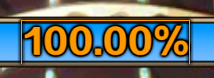
The size of the luminescent filter is fixed
The luminous filter also displays differently in the viewport size
Pay attention to the two pictures below
Looking at the middle of the zero, the filter shows an error
I think the size of the luminous filter is set according to the size of the viewport
How should I achieve it?

package;
import starling.core.Starling;
import starling.events.Event;
import starling.display.Sprite;
class View extends Sprite {
public static var stageWidth:Float = 0;
public static var stageHeight:Float = 0;
public static var stageType:Int = 0;
private static var Width:Int = 0;
private static var Height:Int = 0;
private static var node:Sprite;

public static function init(root:Sprite):Void {
	node = root;
	Starling.current.stage.addEventListener(Event.RESIZE, resize);
	resize();
}

private static function resize():Void {
	Width = Starling.current.nativeStage.stageWidth;
	Height = Starling.current.nativeStage.stageHeight;

	Starling.current.stage.stageWidth = Width;
	Starling.current.stage.stageHeight = Height;

	Starling.current.viewPort.width = Starling.current.stage.stageWidth;
	Starling.current.viewPort.height = Starling.current.stage.stageHeight;

	if (Width > Height) {
		stageWidth = Width;
		stageHeight = Height;
		stageType = 1;
		node.rotation = 0;
		node.x = 0;
	} else {
		stageWidth = Height;
		stageHeight = Width;
		stageType = 2;
		node.rotation = Math.PI / 2; // 90度 = π/2 弧度
		node.x = Width;
	}
	Starling.current.stage.dispatchEvent(new Event("resizes"));
}

public function new() {
	super();
}
}
package;
import openfl.Assets;
import openfl.display.StageAlign;
import openfl.display.StageScaleMode;
import starling.core.Starling;
import openfl.text.Font;
import openfl.display.Sprite;
class Main extends Sprite {
public static var font:Font;
private var starling:Starling;

public function new() {
	super();

	stage.scaleMode = StageScaleMode.NO_SCALE;
	stage.align = StageAlign.TOP_LEFT;
	stage.frameRate = 60;

	font = Assets.getFont("FZZDHJW");

	starling = new Starling(Game, stage);
	starling.showStats = true;
	starling.showStatsAt("right", "top", 2);
	starling.supportHighResolutions = true;
	starling.start();
}
}
package;
import starling.display.Sprite;
class Game extends Sprite {
public function new() {
super();
View.init(this);
addChild(new Load());
}
}
<haxelib name="openfl" />
<haxelib name="starling" />

<window allow-high-dpi="true" />

<assets path="fonts/FZZDHJW.TTF" id="FZZDHJW" embed="true" />
<assets path="images" embed="false" preload="false" />
<assets path="Texture" embed="false" preload="false" />
<assets path="sounds" embed="false" preload="false" />
Starling uses radians, not degrees. A circle is 2π radians.
So π = 3.14159 radians
A full circle is 2x π = 6.28318 radians
So 90° = 1.5708 radians (¼ 2π, or ½ π).
That’s all rather complicated, so luckily Starling includes some helpers for this:
import starling.utils.MathUtil;

sprite.rotation = MathUtil.deg2rad(90); // Rotate to 90 degrees
trace(MathUtil.rad2deg(sprite.rotation)); // Trace rotation as degrees
After you instantiate your AssetManager, setting its verbose property would provide output of what has been loaded for debugging purposes:
assetManager.verbose = true;
From the manual:
With an enabled
verboseproperty, you’ll see the names with which the assets can be accessed.[AssetManager] Adding sound ‘explosion’
[AssetManager] Adding texture ‘bird’
[AssetManager] Adding texture ‘atlas’
[AssetManager] Adding texture atlas ‘atlas’
So to use your example:
loadAss = new AssetManager();
loadAss.verbose = true;
loadAss.enqueue(["Texture/load.png", "Texture/load.xml"]);
loadAss.loadQueue(complete, error, progress);
I would expect Flash doesn’t support OGG. You’ll likely need target conditional assets and code, to handle MP3 (for Flash) and OGG (for everything else) accordingly. This method conditionally adds an ogg or mp3, giving it a consistent id ("winner") it can be referenced by:
project.xml:
<assets path="assets/sfx/winner.ogg" id="winner" type="sound" unless="flash air" />
<assets path="assets/sfx/winner.mp3" id="winner" type="sound" if="flash air" />
In code, when loading the sound:
var winnerSound:Sound = Assets.getSound("winner");
Alternatively, you could add the entire folder and then add #if !flash and #else style conditions in your code when loading the sounds.
Also be aware, that Flash MP3’s must be 44.1kHz, it does not support 48kHz audio (nothing to do with OpenFL).
I’m not sure how to achieve what you’re after, in code, but I do recall that being an issue even years ago under Starling for AS3.
If you’re using bitmap fonts, some tools let you pre-bake outlines and shadows. This has two benefits: