Hi, this topic might sound trivial but it’s bugging me a lot. I like how HaxeDevelop can auto-generate class members from method parameters, but there’s one annoying thing:
When I auto-declare a private member, I get this:
var privateMember:MovieClip;
When I auto-declare a public member, I get:
public var publicMember:MovieClip;
I know that members are private by default in Haxe, but this looks messy in code.
I tried to fix this using templates, something like:
<<if $(Modifiers) != "">>
    <<$(Modifiers)>> var $(Name)<<:$(Type)>>$(EntryPoint)<< = $(Value>>;
<<else>>
    private var $(Name)<<:$(Type)>>$(EntryPoint)<< = $(Value>>;
<<end>>
…but it doesn’t work. HaxeDevelop seems to ignore else in templates.
Does anyone know a clean way to make HaxeDevelop always generate private for members when no modifier is entered?
Is there a template trick I’m missing?
Or do I need to do some “pre-processing” in code before generating members?
Good morning, developer. First of all, I am shocked because as far as I know, “HaxeDevelop” has long stopped updating, and most people are using “vscode”. I didn’t expect you to still be using “HaxeDevelop”
I still use HaxeDevelop as well, happy to see I’m not the only one
I only use vscode when I want to debug on html5, I guess I’m just too used to HaxeDevelop (and FlashDevelop before that)
I remember the last time I downloaded ‘HaxeDevelop’,
I found that the “haxe” in “HaxeDevelop” is a “3x” version,
What I’m saying is that the template for creating a project using ‘HaxeDevelop’ displays’ haxe3x ’
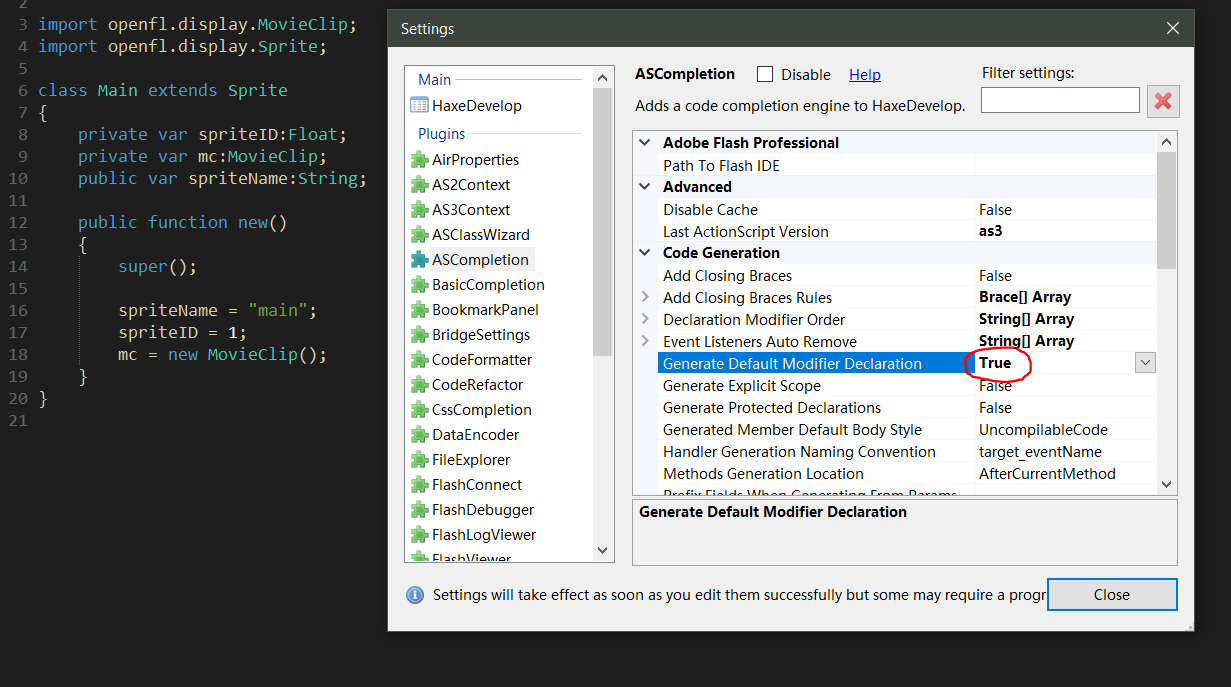
In HaxeDevelop, go to Tools → Program Settings → ASCompletion → Code Generation → Generate Default Modifier Declaration = true.
This will also affect Haxe code generation.
Thanks. This worked great. I can’t tell how many times I used to change this manually. I prefer developing game on old PC so that I can automatically know if the code is heavy. It is so old that I can not install VS Code
It’s actually cool some people still use it. I loved using FlashDevelop, it was a great IDE. For a little while I was so disatisfied with the alternatives, I resorted to using text editors like Notepad++ and later Kate.
It is a shame it was let go and never really got picked up
I use VSCode now, and @joshtynjala’s extensions there really make a big difference, but there are still things I can’t do (or haven’t figured out how at least) that I used to be able to do in FlashDevelop, particularly with code refactoring.