Is the font color of the 'starling' bitmap not working?

There are many aspects of game development that are a trade-off of some sort.

It’d probably pay to test this yourself, and weight up the benefits. Composing text into a batch is CPU work. Compose too much at once, and it may become a CPU performance issue, directly impacting framerate.

So on one hand you have a reduction of GPU calls with batching.
On the other hand you have increased CPU overhead.

Weigh it up in the context of your game, and see what’s going to work for you.

I would also note, that because this is a mature framework, some of the notes you find in the code may be less of an issue now, than they were in the past. CPU’s are a lot more powerful now than they were 9 years ago when that comment was added to the Starling codebase. You’re also working with Starling for OpenFL, not AS3 (which that comment was written under).

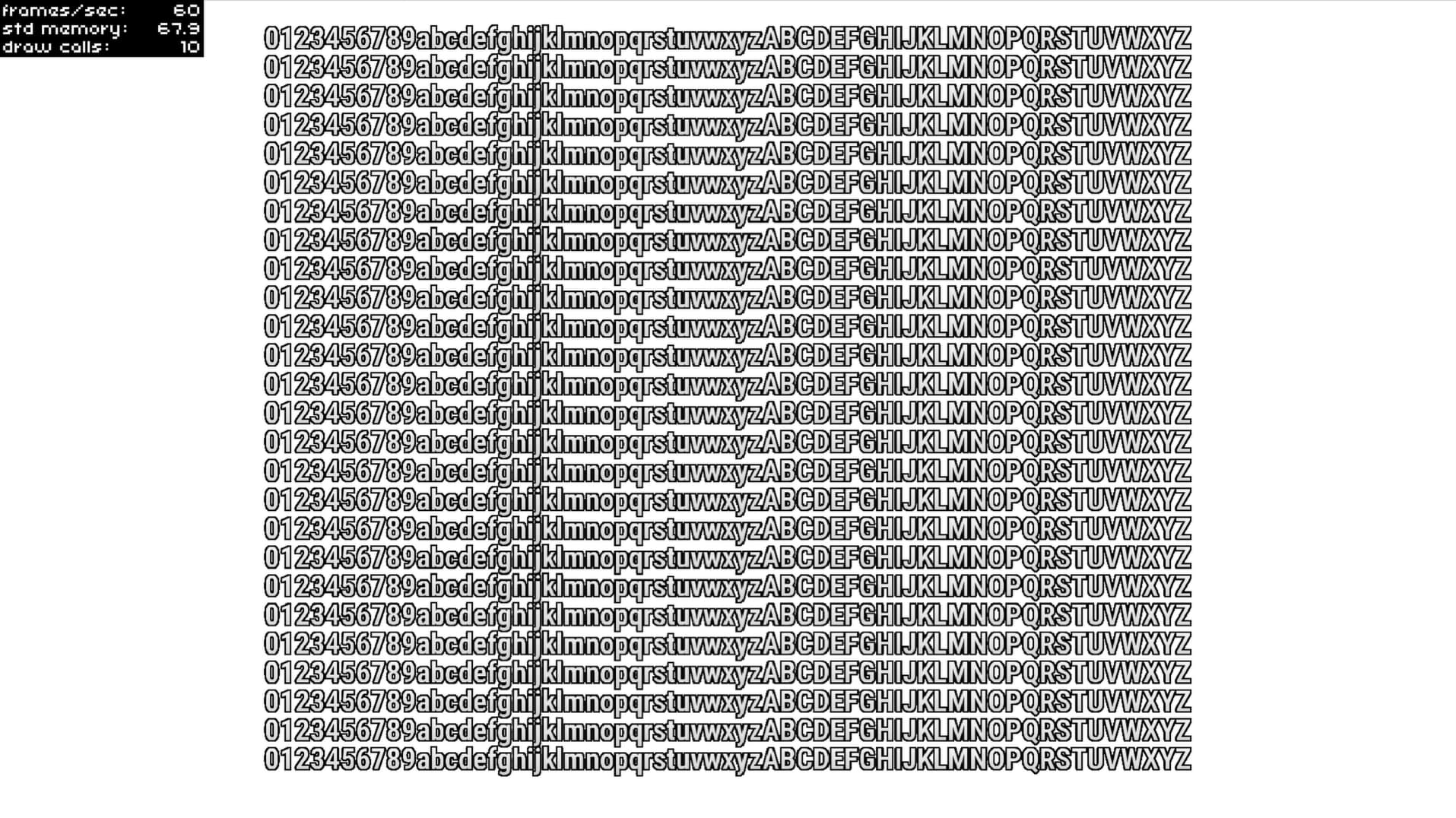
When I test this, I’m getting a little over 16,000 characters per draw call. The below code renders 1,612 characters per TextField, and I create 100 text fields (161,200 characters total). The result is 10 draw calls.

class StarlingRoot extends Sprite {
	public function new() {
		super();
		addEventListener(Event.ADDED_TO_STAGE, onAddedToStage);
	}

	private function onAddedToStage(e:Event):Void {
		removeEventListener(Event.ADDED_TO_STAGE, onAddedToStage);

		var tex:Texture = Texture.fromBitmapData(Assets.getBitmapData("img/RobotoCondensed.png"), false);
		var font:BitmapFont = new BitmapFont(tex, Xml.parse(Assets.getText("xml/RobotoCondensed.xml")));
		var fontName:String = font.name != null ? font.name : "RobotoCondensed";
		TextField.registerCompositor(font, fontName);
		var textFormat:TextFormat = new TextFormat(fontName, 38, 0xFFFFFF);

		for (i in 0...100) {
			var textField:TextField = new TextField(stage.stageWidth, stage.stageHeight, "0123456789abcdefghijklmnopqrstuvwxyzABCDEFGHIJKLMNOPQRSTUVWXYZ
			0123456789abcdefghijklmnopqrstuvwxyzABCDEFGHIJKLMNOPQRSTUVWXYZ
			0123456789abcdefghijklmnopqrstuvwxyzABCDEFGHIJKLMNOPQRSTUVWXYZ
			0123456789abcdefghijklmnopqrstuvwxyzABCDEFGHIJKLMNOPQRSTUVWXYZ
			0123456789abcdefghijklmnopqrstuvwxyzABCDEFGHIJKLMNOPQRSTUVWXYZ
			0123456789abcdefghijklmnopqrstuvwxyzABCDEFGHIJKLMNOPQRSTUVWXYZ
			0123456789abcdefghijklmnopqrstuvwxyzABCDEFGHIJKLMNOPQRSTUVWXYZ
			0123456789abcdefghijklmnopqrstuvwxyzABCDEFGHIJKLMNOPQRSTUVWXYZ
			0123456789abcdefghijklmnopqrstuvwxyzABCDEFGHIJKLMNOPQRSTUVWXYZ
			0123456789abcdefghijklmnopqrstuvwxyzABCDEFGHIJKLMNOPQRSTUVWXYZ
			0123456789abcdefghijklmnopqrstuvwxyzABCDEFGHIJKLMNOPQRSTUVWXYZ
			0123456789abcdefghijklmnopqrstuvwxyzABCDEFGHIJKLMNOPQRSTUVWXYZ
			0123456789abcdefghijklmnopqrstuvwxyzABCDEFGHIJKLMNOPQRSTUVWXYZ
			0123456789abcdefghijklmnopqrstuvwxyzABCDEFGHIJKLMNOPQRSTUVWXYZ
			0123456789abcdefghijklmnopqrstuvwxyzABCDEFGHIJKLMNOPQRSTUVWXYZ
			0123456789abcdefghijklmnopqrstuvwxyzABCDEFGHIJKLMNOPQRSTUVWXYZ
			0123456789abcdefghijklmnopqrstuvwxyzABCDEFGHIJKLMNOPQRSTUVWXYZ
			0123456789abcdefghijklmnopqrstuvwxyzABCDEFGHIJKLMNOPQRSTUVWXYZ
			0123456789abcdefghijklmnopqrstuvwxyzABCDEFGHIJKLMNOPQRSTUVWXYZ
			0123456789abcdefghijklmnopqrstuvwxyzABCDEFGHIJKLMNOPQRSTUVWXYZ
			0123456789abcdefghijklmnopqrstuvwxyzABCDEFGHIJKLMNOPQRSTUVWXYZ
			0123456789abcdefghijklmnopqrstuvwxyzABCDEFGHIJKLMNOPQRSTUVWXYZ
			0123456789abcdefghijklmnopqrstuvwxyzABCDEFGHIJKLMNOPQRSTUVWXYZ
			0123456789abcdefghijklmnopqrstuvwxyzABCDEFGHIJKLMNOPQRSTUVWXYZ
			0123456789abcdefghijklmnopqrstuvwxyzABCDEFGHIJKLMNOPQRSTUVWXYZ
			0123456789abcdefghijklmnopqrstuvwxyzABCDEFGHIJKLMNOPQRSTUVWXYZ
			", textFormat);
			textField.batchable = true;
			textField.pixelSnapping = true;
			addChild(textField);
		}
	}
}
openfl test html5
.
Our testing methods are completely different. I batch modify the content of 120 text boxes in the frame update event. The content of these 120 text boxes is less than 15 characters, otherwise we can only reduce the number of text boxes. The API’s statement is valid
.
Let me put it this way, at the beginning, I used “for” to create 120 text boxes and put them in an “Array”, added an “enterFrame” event, and batch modified the content of the text boxes. The content of the text boxes is less than 15 characters, and if it exceeds 15 characters, the number of text boxes can only be reduced because the fps will decrease
.

When reporting a possible issue, it truly helps to share the code that provides the example of the issue. Otherwise, as you’ve noted, our testing methods are completely different.

Truly, too often I have attempted to help, only to get, “no that’s not what I mean”. Please, provide examples.

When I have time, I will create a ‘demo’,
Did you say that I only read the ‘as3 API’? Because I cannot find the ‘openfl starling API’

Excellent :+1:

No I made no claim that you’d “only read” anything. I simply said that the API doc notes that stipulate the batching character limit, were added to the TextField class 9 years ago in the original Starling for AS3 project.

Those comments exist in the OpenFL TextField too, but they originated from the AS3 project. Like many things that were migrated to OpenFL, a lot of the original AS3 doc comments remain.

To clarify what I mean by that (as translation may not render it clearly), I’m alluding to the fact that OpenFL (Haxe) generally has better performance than AS3.

1 Like

.
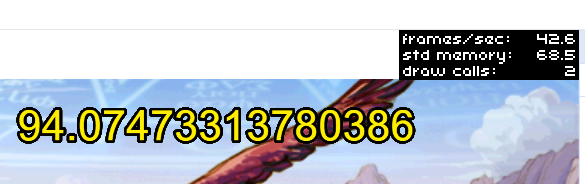
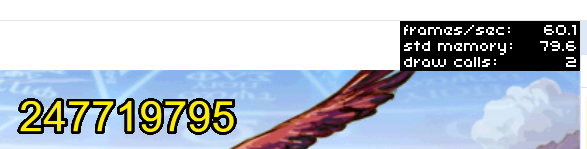
Hey friend, take a look at the impact of the number of characters displayed in 200 bitmap text on performance.
.
Display content greater than 15 characters


.
Display content less than 15 characters

.
The same amount of bitmap text,
Because the number of characters displayed varies,
The performance is also different, as demonstrated by the API,
Only batch processing within 15 characters is allowed.
.

.
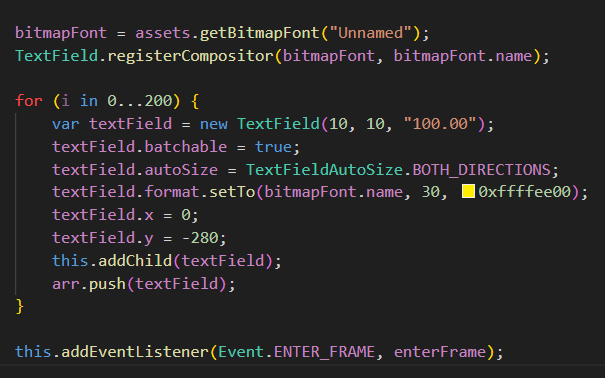
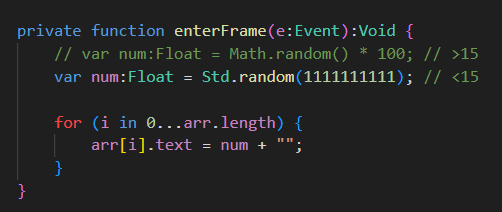
This is the complete code
.

package;

import starling.text.BitmapFont;
import starling.text.TextFieldAutoSize;
import starling.events.Event;
import starling.text.TextField;
import starling.display.MovieClip;
import starling.display.Image;
import starling.assets.AssetManager;
import starling.display.Sprite;

class Load extends Sprite {
private var assets:AssetManager;
private var bg:Image;
private var go:MovieClip;
private var type:String;
private var bitmapFont:BitmapFont;
private var arr:Array = ;

public function new() {
	super();

	assets = new AssetManager();
	assets.enqueue([
		"TextureAtlas/load.png",
		"TextureAtlas/load.xml",
		"TextureAtlas/Unnamed.png",
		"TextureAtlas/Unnamed.fnt",
	]);
	assets.loadQueue(complete, error, progress);
	type = "load";
}

private function complete():Void {
	if (type == "load") {
		bg = new Image(assets.getTexture("bg_0000"));
		bg.x = 0;
		bg.y = 0;
		this.addChild(bg);

		go = new MovieClip(assets.getTextures("go_"), 12);
		go.currentFrame = 99;
		go.x = 0;
		go.y = 200;
		this.addChild(go);

		bitmapFont = assets.getBitmapFont("Unnamed");
		TextField.registerCompositor(bitmapFont, bitmapFont.name);

		for (i in 0...200) {
			var textField = new TextField(10, 10, "100.00");
			textField.batchable = true;
			textField.autoSize = TextFieldAutoSize.BOTH_DIRECTIONS;
			textField.format.setTo(bitmapFont.name, 30, 0xffffee00);
			textField.x = 0;
			textField.y = -280;
			this.addChild(textField);
			arr.push(textField);
		}

		this.addEventListener(Event.ENTER_FRAME, enterFrame);

		stage.addEventListener("ress", ress);
		ress(null);
		return;
	}
}

private function enterFrame(e:Event):Void {
	// var num:Float = Math.random() * 100; // >15
	var num:Float = Std.random(1111111111); // <15

	for (i in 0...arr.length) {
		arr[i].text = num + "";
	}
}

private function error(e:String):Void {
	if (type == "load") {
		return;
	}
}

private function progress(e:Float):Void {
	if (type == "load") {
		return;
	}
}

private function ress(e:Event):Void {
	final ow:Float = View.stageWidth / 800;
	final oh:Float = View.stageHeight / 600;
	var sc:Float = 1;

	ow > oh ? sc = oh : sc = ow;

	this.scale = sc;
	this.x = View.stageWidth / 2;
	this.y = View.stageHeight / 2;
}

}
.

.
As I mentioned before, the testing method is to first create a certain number of bitmap texts in bulk, here 200, and then modify the display content of the bitmap texts in bulk during the frame update event. When the display content is less than 15, the performance is better, and when the display content is greater than 15, the frame rate is less than 60
.
The API documentation also states that bitmap text batch processing only supports up to 15 characters, and personally, I feel that 15 characters is still too few.
.


.
On my current computer, during the same test, the maximum number of “starling” bitmap characters is 200, the number of “creatjs true type” vector characters is 400, and the number of bitmap characters is 5000
.

.
In the same test, the maximum number of bitmap characters for “starling” is 200, the maximum number of vector characters for “creatjs” is 400, and the maximum number of bitmap characters is 5000
.
The maximum quantity for “starling movieclip” is 3500, and the maximum quantity for “creating js sprites” is 8000
.
Starling has a huge gap in both bitmap text and moving clip animation performance compared to ‘Create JS’.
.
I always thought that the performance of “Starling” was higher than that of “Create JS”, but testing showed the opposite So I have said several times before that I hope “openfl starling” can focus on performance optimization
.
This is the result of testing on my current computer, an old computer from over 10 years ago.
.

.
I am just a beginner in “openfl”,
I’m just reflecting my test results,
If there are any mistakes, please feel free to correct them.
.

I think I’ve been able to reproduce what you’re referring to. It was especially an issue under Neko (which really struggled), but that’s not particularly surprising. hl, cpp and html5 did ok, notably when using -final. Using -debug with cpp brought it to a halt, but less so hl and html5.

The main issues is the updating of all TextFields on EnterFrame, triggering re-composition (total textFields * framerate). It’s not an issue when the content of the TextField hasn’t changed, or changes less frequently, such as it might in response to an in-game event.

The results on my system were a bit higher, but that’s probably just down to hardware, OS and subtle coding differences.

So first up, is this issue a performance for performance sake issue? That’s not to say it’s not worth looking at, and performance optimisation down the line can’t be achieved. It’s a question of, is this issue impacting your real-world use case of Starling in a project?

Simply put:

  • Are you needing update 5,000 characters of text, 60 times per second, every second?
  • Are you needing 8,000 sprites on stage at once?

Or: Is this simply wanting Starling to be faster because you’ve benchmarked it against Create.js?

If you are needing 5,000 characters of text updated on EnterFrame, and 8,000 sprites on stage at once, then we can explore ways of making that happen with coding techniques.

If you’re not, then there’s no need to spend time on that :sweat_smile:

Good morning, old friend,
My project currently does not require rendering a large number of text boxes and animations simultaneously. This is just a performance test comparison I conducted using “Starling” and “Create JS”

1 Like

For the offline version:
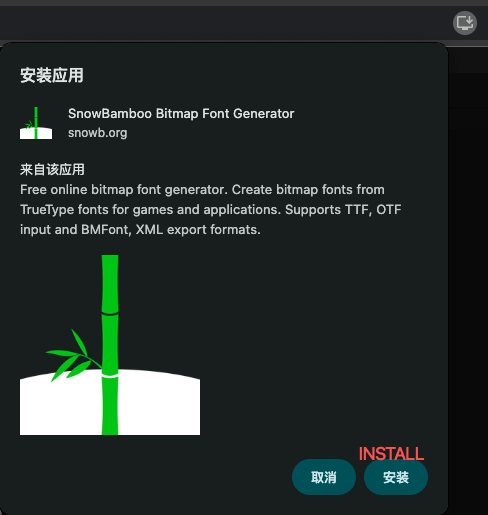
When you visit snowb.org, you’ll see an install icon on the right side of your browser’s address bar. Just click it, and you’ll get a prompt to install. Hit “Install” and boom - it’s on your computer and works offline! No complicated setup needed :blush:


1 Like