I found that Activate and Deactivate events of Stage are not triggering in an iOS app when the app goes to background and back.
Lib.current.stage.addEventListener(Event.DEACTIVATE, onDeactivate); // <== never triggers
Lib.current.stage.addEventListener(Event.ACTIVATE, onActivate); // <== triggers once on start-up
I tested this behavior on Actuate sample code from OpenFL Samples:
I just put traces to stage_onActivate and stage_onDeactivate, built and run on iPhone and it didn’t work.
Is it a bug?
If not, when how to detect that the app goes to background on iOS?
The Activate events only triggered once on launch, here is the log (“Resume” comes from stage activate):
Launched application with org.openfl.samples.actuateexample bundle identifier. Waiting for the application to terminate… 2026-03-12 09:27:46.315 ActuateExample[1395:78517] You need UIApplicationSupportsIndirectInputEvents in your Info.plist for mouse support ../../../../Source/Main.hx:16: New ../../../../Source/Main.hx:70: NWin activate ../../../../Source/Main.hx:68: NApp activate ../../../../Source/Main.hx:82: Resume 2026-03-12 09:27:46.360 ActuateExample[1395:78517] Unbalanced calls to begin/end appearance transitions for <SDL_uikitviewcontroller: 0x11ac6c500>. 2026-03-12 09:27:46.360 ActuateExample[1395:78517] Unbalanced calls to begin/end appearance transitions for <SDL_uikitviewcontroller: 0x11ac6c500>. 2026-03-12 09:27:46.360 ActuateExample[1395:78517] Unbalanced calls to begin/end appearance transitions for <SDL_uikitviewcontroller: 0x11ac6c500>. 2026-03-12 09:27:46.360 ActuateExample[1395:78517] Unbalanced calls to begin/end appearance transitions for <SDL_uikitviewcontroller: 0x11ac6c500>.
By the way, when the app goes to background, there are several errors in the console as one below, and I saw these errors in any other app I built recently:
2026-03-12 09:28:16.000 ActuateExample[1395:78766] GLDRendererMetal command buffer completion error: Error Domain=MTLCommandBufferErrorDomain Code=7 “Insufficient Permission (to submit GPU work from background) (00000006:kIOGPUCommandBufferCallbackErrorBackgroundExecutionNotPermitted)” UserInfo={NSLocalizedDescription=Insufficient Permission (to submit GPU work from background) (00000006:kIOGPUCommandBufferCallbackErrorBackgroundExecutionNotPermitted), NSUnderlyingError=0x11af39470 {Error Domain=IOGPUCommandQueueErrorDomain Code=6 “(null)”}}
Looks like this is because the app couldn’t detect that it’s on background and it’s trying to render or such…
According to the README-ios in SDL, SDL has SDL_APP_WILLENTERBACKGROUND, SDL_APP_DIDENTERBACKGROUND, SDL_APP_WILLENTERFOREGROUND and SDL_APP_DIDENTERFOREGROUND. We handle those in Lime, which should result in the Lime Window to dispatch its onActivate and onDeactivate.
It must be something in OpenFL that isn’t properly listening for that event.
I could actually fix it by modifying SDL. It took quite some time
So basically I copied the code related to the scene-based UIKit app lifecycle from SDL 3.4 to the current SDL module included in Lime. The fix is not easy to apply, but anyway, this is how you can do it:
You will need Lime submodules to rebuild lime and tools (and ios later). You can follow these steps (except it’s macos, not windows): How rebuild Lime? - #10 by singmajesty.
Replace the files in Lime/SDL ([YOUR LIME DIR]/project/lib/sdl) with the files from here: Dropbox.
It’s definitely not a good solution, it can’t be even submitted as a pull request, because it makes changes to a submodule… I guess the only real fix would be updating the SDL submodule in Lime to version 3.4.0+, that can be hard since there was a lot of changes in SDL v3+ compared to v2.
Looks like I will need to go through this too for my next update, since the requirement changes on April 28th currently updating the macbook now so Xcode 26 can be installed. Always dread this time of year
Are the changes to info.plist mandatory? Is there anything specific that we should put in there?

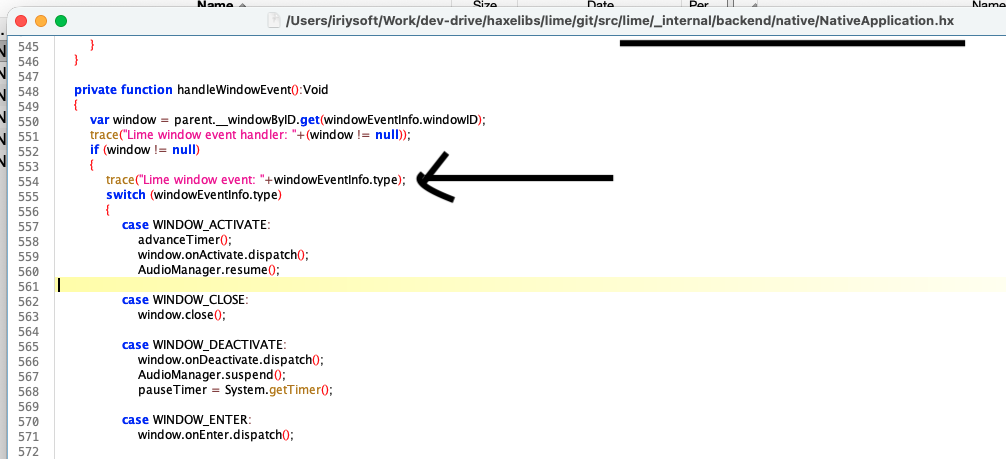
 I added the listeners as follows:

 currently updating the macbook now so Xcode 26 can be installed. Always dread this time of year