Hey, everyone “openfl” developers, I encountered an error when trying to publish “apk” using “lime build android” for the first time. Can I request support?
<?xml version="1.0" encoding="utf-8"?>
<config>

	<section id="defines">

		<set name="SDK_ROOT" value="HOME/SDKs/" />
		<set name="ANDROID_NDK_DIR" value="HOME/SDKs/" />
		<set name="ANDROID_SDK" value="C:\Users\Administrator\AppData\Local\Android\Sdk" />
		<set name="ANT_HOME" value="HOME/SDKs//ant" />
		<set name="JAVA_HOME" value="C:\Program Files\Eclipse Adoptium\jdk-25.0.4.7-hotspot" />

	</section>
	<define name="AIR_SDK" value="D:\AIRSDK\AIRSDK_51.3.3.2" />
	<define name="ANDROID_NDK_ROOT" value="C:\Users\Administrator\AppData\Local\Android\Sdk\ndk\30.0.16138531" />
	<define name="ANDROID_SETUP" value="true" />

</config>
PS C:\Users\Administrator\Desktop\SimpleBox2D> lime build android -debug
Which version of hxcpp do you have? You should use the git version:haxelib git hxcpp https://github.com/HaxeFoundation/hxcpp
Thank you for your answer. Is there a problem with using ‘haxelib hxcpp’?
By the way, why did you recommend me to use “git hxcpp”?
There are android ndk issues with hxcpp 4.3.2 that are only solved in git hxcpp:
master ← player-03:ndk23
opened 05:40AM - 24 May 22 UTC
Version 22 changed the NDK's structure, meaning some files and folders aren't wh… ere hxcpp expects them.
---
To test this, create the following three files, and compile with `haxelib run hxcpp Build.xml -Dandroid`.
1. Hello.cpp:
```cpp
#include <stdio.h>
#include <atomic>
int main(int argc, char **argv) {
printf("Hello world\n");
return 0;
}
```
2. Build.xml:
```xml
<xml>
<set name="HXCPP_ARM64" value="1" if="android" />
<files id="hello">
<file name="Hello.cpp" />
</files>
<target id="default" output="hello" tool="linker" toolid="${STD_MODULE_LINK}">
<outdir name="bin" />
<ext value="" />
<files id="hello" />
</target>
</xml>
```
3. Options.txt: (empty)
---
In my tests, NDK r21e worked fine, but r23 (edit: and r24) ran into multiple errors upon reaching `#include <atomic>`. (First it couldn't find the file, then it couldn't compile it.)
After applying the changes in this pull request, r21e, r23, and r24 all work correctly. I'm not certain there are no regressions elsewhere, but I tried to minimize that risk.
Potentially useful reference: https://developer.android.com/ndk/guides/other_build_systems
---
Closes #706.
master ← Apprentice-Alchemist:patch-1
opened 09:05AM - 26 Jul 24 UTC
NDK r26 has dropped support for API levels 19 and 20.
This only affects armv7 a… nd x86, 64-bit architectures already required API level 21 or higher.
https://github.com/android/ndk/wiki/Changelog-r26#announcements
They can cause similar errors to the ones you were experiencing.
Okay, thank you for your answer. The “Java JDK” I used was “17.0”, the “Android NDK” was “21.4”, and then I used “Git hxcpp”
<set name="ANDROID_SDK" value="C:\Users\Administrator\AppData\Local\Android\Sdk" />

<define name="ANDROID_NDK_ROOT" value="C:\Users\Administrator\AppData\Local\Android\Sdk\ndk\21.4.7075529" />

<set name="JAVA_HOME" value="C:\Program Files\Eclipse Adoptium\jdk-17.0.20.101-hotspot" />
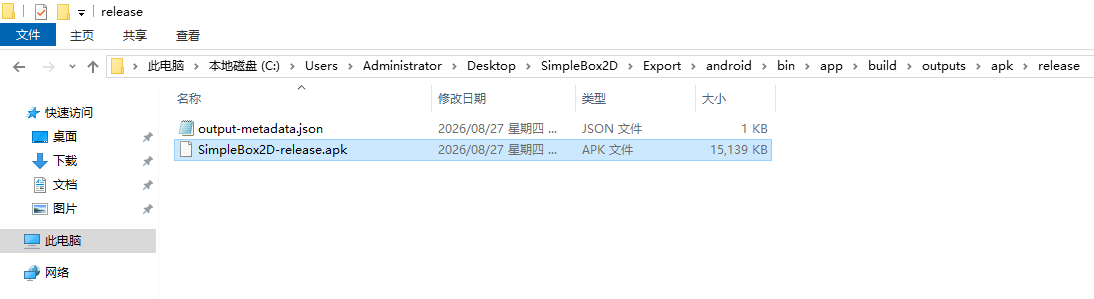
I have successfully published the ‘. apk’ file, but I have encountered an issue where I am using ‘- release’ to publish, but the file contains the word ‘debug’
SimpleBox2D-debug.apk ?
I now know that the certificate needs to be referenced in the project configuration file in order to correctly publish the ‘apk’
<?xml version="1.0" encoding="utf-8"?>
<project>

	<meta title="Simple Box2D" package="org.openfl.samples.simplebox2d" version="1.0.0"
		company="OpenFL" />
	<app file="SimpleBox2D" main="Main" path="Export" />

	<source path="Source" />

	<haxelib name="openfl" />
	<haxelib name="box2d" />

	<assets path="Assets" rename="assets" />

	<certificate path="my-release-key.jks" password="785597448" alias="my-alias" />

</project>
Microsoft Windows [版本 10.0.19045.7417]
C:\Users\Administrator>haxelib list
C:\Users\Administrator>
1 Like