Does Starling’s built-in Tween not provide easy sine bounce?
Not even providing a timeline?
The actuator provides a sine bounce but does not provide a timeline
And all of these gtweeks support

Does Starling’s built-in Tween not provide easy sine bounce?
Not even providing a timeline?
The actuator provides a sine bounce but does not provide a timeline
And all of these gtweeks support
I’m not quite sure what you mean by “easy sine”, but Starling’s Transitions class provides:
EASE_IN_BOUNCEEASE_OUT_BOUNCEEASE_IN_OUT_BOUNCEEASE_OUT_IN_BOUNCE
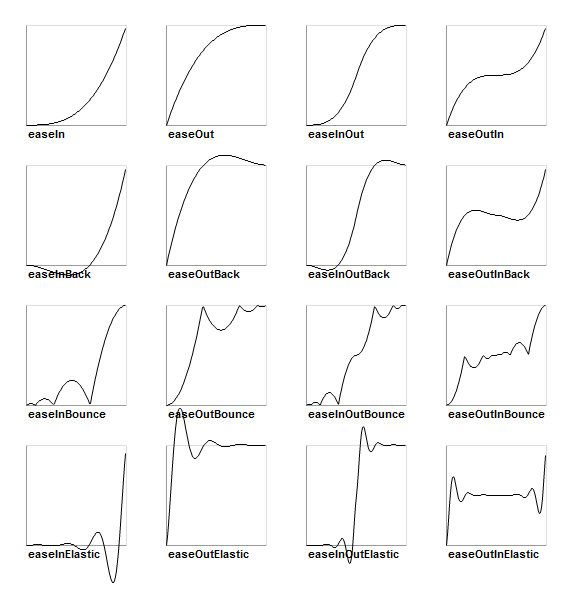
Both of the above two teen libraries have these, Starling, I didn’t see them
ease: “sine.out”
ease: “sine.in”
ease: “bounce.out”
ease: “bounce.in”
When it comes to timelines, only “tweenlite” and “gtween” have them, while the timelines for starling and actuator seem to be different!
let tl = gsap.timeline(); //create the timeline
tl.to(“.class1”, { x: 100 }) //start sequencing
.to(“.class2”, { y: 100, ease: “elastic” })
.to(“.class3”, { rotation: 180 });
The predecessor of “gsap” was “tweenlite”
Got ya’ 
You can register new Transitions in Starling, so you can actually take the easing you want from Actuate's motion.easing.Sine or com.gskinner.motion.easing.Sine, and use them like this:
A custom class containing the custom easing:
import starling.animation.Transitions;

class CustomEasings {

    public static inline var EASE_IN_SINE:String = "easeInSine";
    public static inline var EASE_OUT_SINE:String = "easeOutSine";
    public static inline var EASE_IN_OUT_SINE:String = "easeInOutSine";

    public static function register():Void {
        Transitions.register(EASE_IN_SINE, function(ratio:Float):Float {
            return 1 - Math.cos(ratio * (Math.PI / 2));
        });

        Transitions.register(EASE_OUT_SINE, function(ratio:Float):Float {
            return Math.sin(ratio * (Math.PI / 2));
        });

        Transitions.register(EASE_IN_OUT_SINE, function(ratio:Float):Float {
            return -0.5 * (Math.cos(Math.PI * ratio) - 1);
        });
    }
}
Then elsewhere, make sure you call the register() method:
CustomEasings.register();
Then to use it, it’d be something like:
var tween = new Tween(someSprite, 0.5, Transitions.getEase(CustomEasings.EASE_IN_SINE));